Keyword match types decide how closely a search has to resemble your keyword before Google Ads will show your ad. Pick a loose match type and your ads reach far more searches. Pick a strict one and you get more control over exactly where your money goes.
Google Ads now has three match types: broad, phrase and exact. Each one trades reach for control in a different way, and the right mix depends on your budget, your bidding strategy and how much time you can spend reviewing search terms.
Here is how each match type affects your reach, what Google says about how they work today, and how to choose the right one for your campaigns.
Watch: Keyword Match Types Explained
The Three Match Types At A Glance
According to Google Ads Help, each match type is written differently in your account and reaches a different share of searches:
| Match type | How you write it | Ads can show for | Reach | Control |
|---|---|---|---|---|
| Broad match | running shoes | Searches related to your keyword, even without the same words | Highest | Lowest |
| Phrase match | “running shoes” | Searches that include the meaning of your keyword | Medium | Medium |
| Exact match | [running shoes] | Searches with the same meaning or intent | Lowest | Highest |
Google also notes that broader match types include the queries of narrower ones. A broad match keyword can show for all the searches its phrase and exact versions would reach, plus many more.
Broad Match: The Widest Reach
Broad match is the default. If you add a keyword without quotes or brackets, it is broad match.
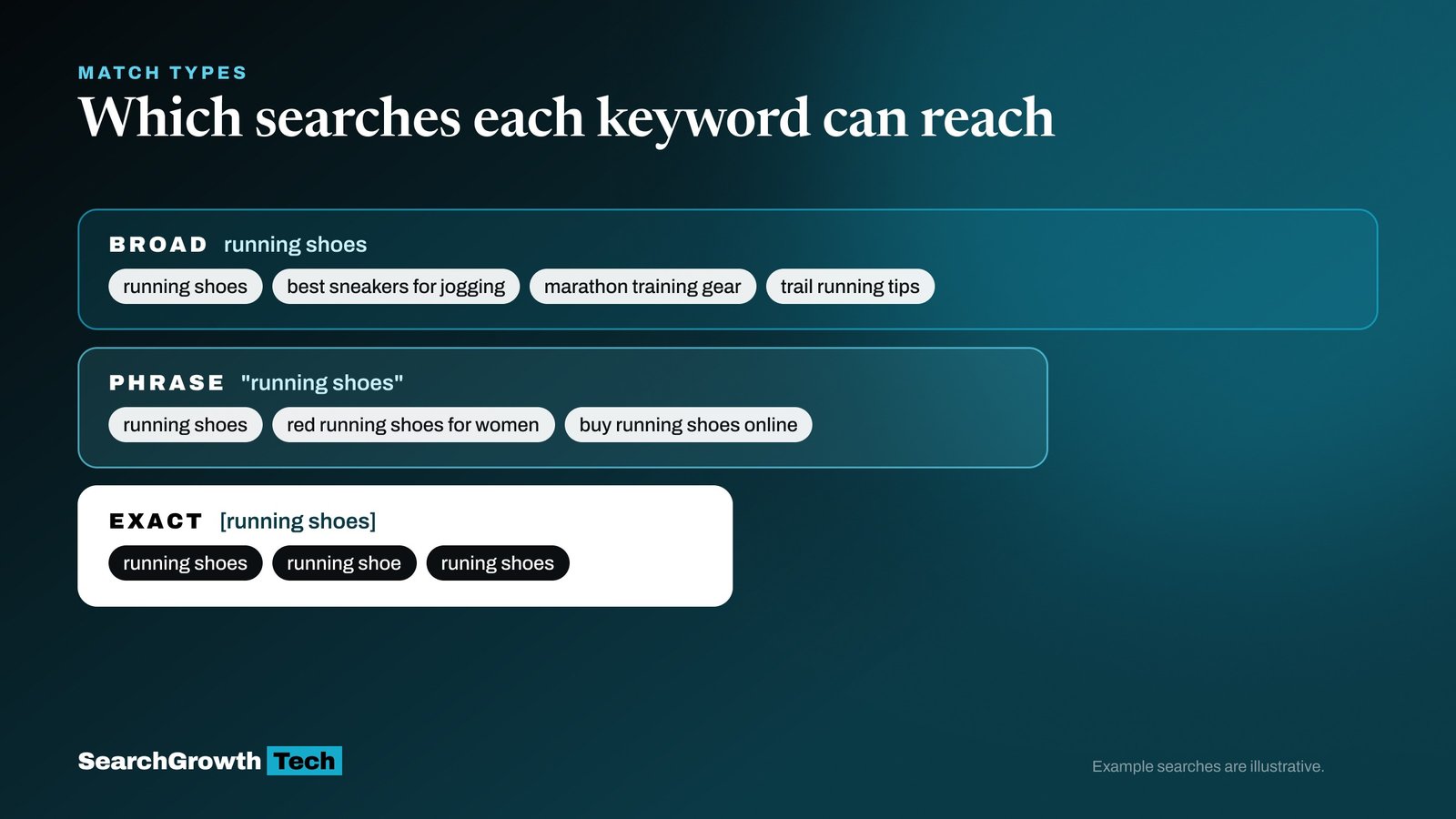
With broad match, your ad can show for searches that are related to your keyword, even when they do not include its words. Google’s own example is the keyword low carb diet plan, which could match searches about carb-free foods or Mediterranean diet books.
Google says broad match also looks at more signals than the keyword alone, including:
- The user’s recent searches
- The content of your landing page and ad assets
- The other keywords in the same ad group
Effect on reach: broad match reaches the largest number of searches. That is useful for finding new queries you would never have thought to add yourself, but it also means more irrelevant clicks if you are not watching closely.
Best for: accounts using Smart Bidding, with enough conversion data for Google’s bidding to learn which searches are worth paying for. Google describes Smart Bidding as critical when you use broad match, because every query is different and bids need to reflect signals at auction time.
Phrase Match: The Middle Ground
Phrase match keywords are written in quotation marks, such as “tennis shoes”.
Your ad can show for searches that include the meaning of your keyword, including more specific searches. A phrase match keyword for “tennis shoes” could reach searches like red tennis shoes for women or buy tennis shoes online, because they contain that meaning plus extra detail.
Effect on reach: phrase match reaches more searches than exact match but fewer than broad match. Word order can still matter when changing it would change the meaning of the search.
Best for: advertisers who want to grow beyond a fixed list of exact searches without opening the door to everything loosely related. It suits campaigns with moderate budgets and manual or partly automated bidding.
Exact Match: Maximum Control
Exact match keywords are written in square brackets, such as [red shoe].
Your ad can show for searches with the same meaning or intent as your keyword. That is not only the identical words: Google also matches close variants such as misspellings, plurals and searches that mean the same thing.
Effect on reach: exact match reaches the fewest searches. In return, you know very closely which searches you are paying for, and your ad copy and landing page can be written specifically for them.
Best for: your most valuable, proven keywords, such as brand terms and high-converting product or service searches, and smaller budgets that cannot afford to test widely.
Which Keyword Wins When Several Match?
If your account has more than one keyword that could match the same search, Google Ads follows an order of priority. According to Google Ads Help:
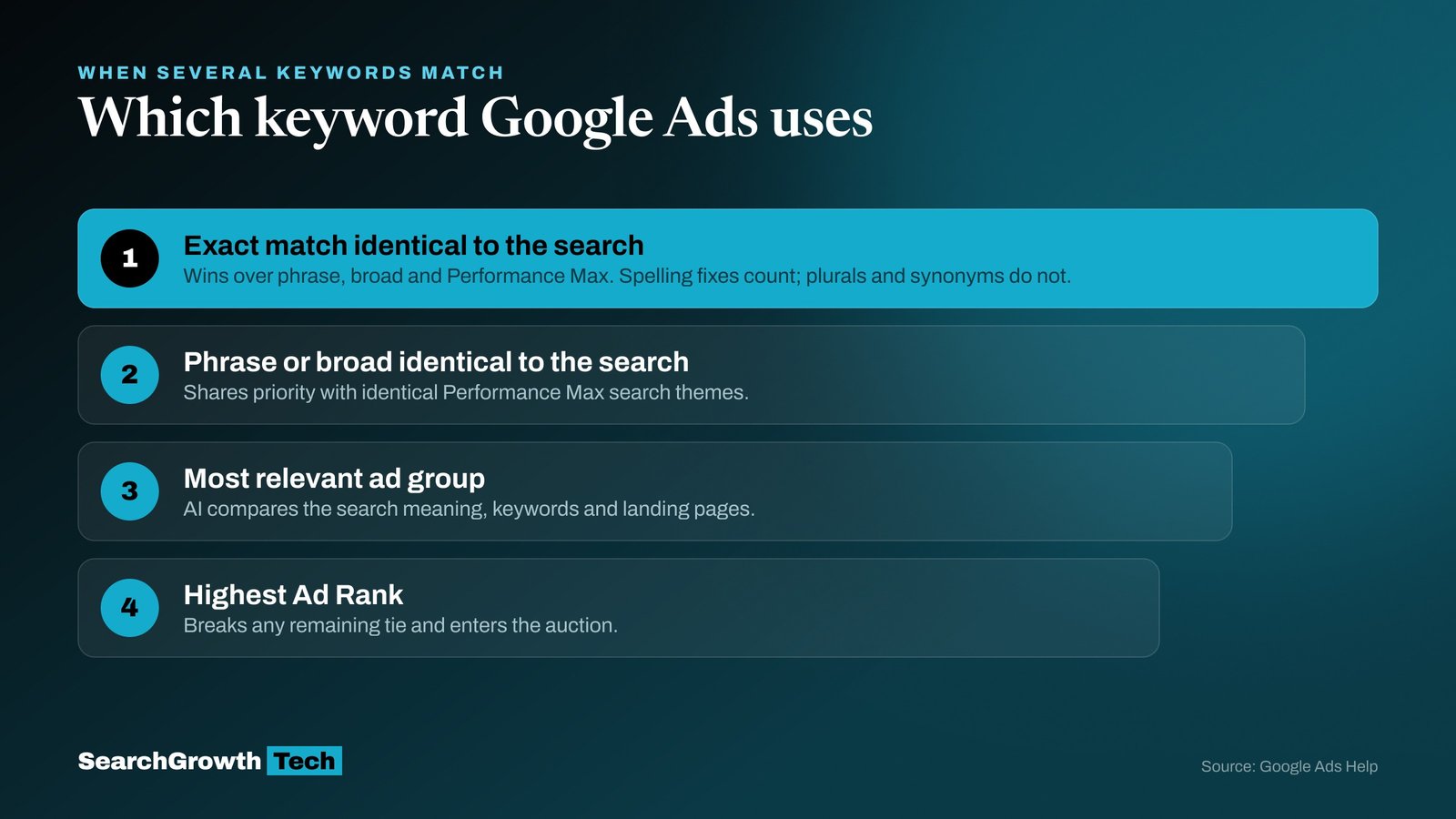
- Exact match keywords identical to the search come first. They take priority over phrase and broad keywords and over Performance Max. Identical includes spell-corrected searches, but not plurals or synonyms.
- Phrase and broad keywords identical to the search come next, alongside identical Performance Max search themes.
- Relevance is used next. If no keyword is identical, Google’s AI keeps only the most relevant ad groups, based on the meaning of the search, the keywords in each ad group and their landing pages.
- Ad Rank breaks any tie. The option with the highest Ad Rank enters the auction.
In practice, this means you can run broad match for discovery and still keep tight control over your most important searches by adding them as exact match keywords. The exact match version will be used whenever the search is identical.
Negative Keywords Shape Your Reach Too
Match types also apply to negative keywords, which stop your ads from showing for searches you do not want. A shop that does not sell baseball hats, for example, would add baseball hats as a negative keyword.
Negative keywords work differently from regular keywords. They do not automatically cover close variants such as plurals or misspellings, so you may need to add those versions yourself. Our guide to negative keyword lists covers how to build them and share them across campaigns.
The more you rely on broad match, the more important a well-maintained negative keyword list becomes.
How To Choose The Right Match Type
There is no single best match type. Use your budget, bidding strategy and goals to decide:
- Small budget or new account: start with exact and phrase match on your most relevant keywords so spend goes to high-intent searches while you collect data.
- Smart Bidding with steady conversions: test broad match to find new searches, and let bidding decide what each one is worth.
- Brand and top performers: keep them as exact match so they are always used for identical searches.
- Finding new keywords: use phrase or broad match, then review the search terms report and move the winners into exact match.
A Simple Testing Process
1. Start Narrow
Launch with exact and phrase match for your core keywords. Set up conversion tracking before you spend.
2. Review Search Terms Weekly
The search terms report shows the real searches that triggered your ads. Add irrelevant ones as negative keywords and promising ones as new keywords.
3. Expand With Broad Match
Once conversions are steady, add broad match versions of proven keywords in the same ad groups, paired with Smart Bidding.
4. Compare Results
Compare cost per conversion and conversion volume by match type. Keep broad match where it adds conversions at an acceptable cost, and pull back where it does not.
5. Repeat
Search behavior changes over time. Keep reviewing search terms and moving keywords between match types as the data tells you to.
Match types also shape how relevant your ads are to each search, which feeds into your Quality Score. If you are still weighing paid traffic against organic rankings, start with SEO vs PPC.
Key Takeaways
- Google Ads has three match types: broad (widest reach), phrase (middle ground) and exact (most control).
- Broad match uses extra signals such as landing pages and other keywords, and Google recommends pairing it with Smart Bidding.
- Exact match keywords identical to a search take priority over phrase, broad and Performance Max.
- Negative keywords do not cover close variants, so add plurals and misspellings yourself.
- Start narrow, review search terms, and expand with broad match once you have conversion data.