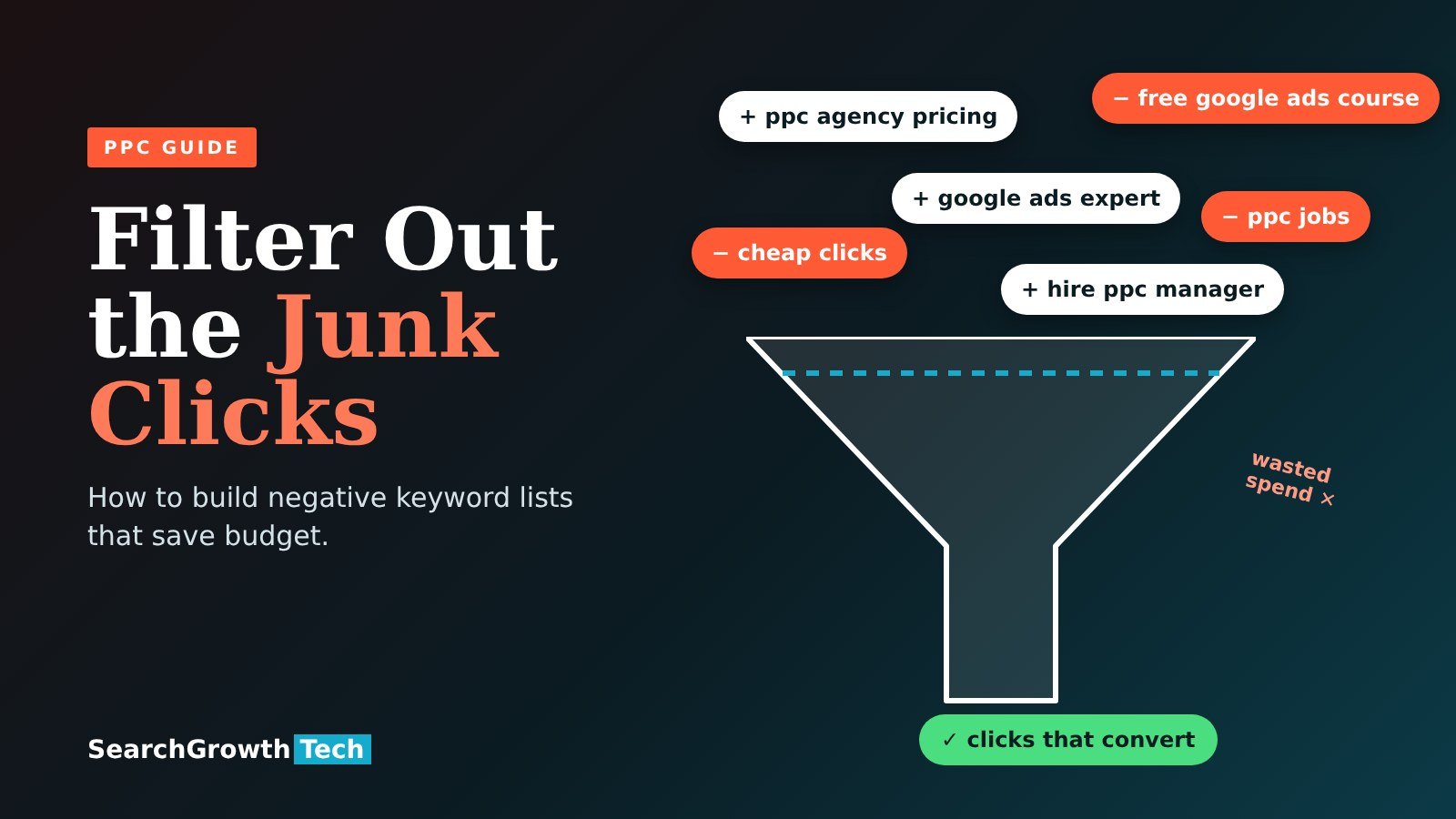
A negative keyword list is a saved set of search terms you never want your ads to show for, which you can apply to many campaigns at once. Instead of adding “free”, “jobs” and “DIY” to every campaign by hand, you build one list, attach it, and every change you make to that list updates all the campaigns that use it.
Negatives work differently from your normal keywords. They do not match close variants, so plurals, synonyms and reworded searches have to be added on purpose. Get that wrong and you either waste budget on junk clicks or block searches that would have converted.
This guide covers how negative match types behave, where negatives can live in your account, how to build lists from your search terms, and how negatives work in Performance Max.
Watch: Negative Keyword Lists in Google Ads Explained
What Negative Keywords Actually Do
A negative keyword stops your ad from entering the auction when a search contains that term. If you sell premium office chairs, adding “cheap” as a negative keeps you out of searches like “cheap office chairs” that rarely buy at your price point.
That gives you three things:
- Less wasted spend: you stop paying for clicks from people who were never going to buy.
- Cleaner data: your conversion rate and cost per conversion reflect the traffic you actually want, and better CTR helps the expected CTR part of your Quality Score.
- Better targeting signals: Smart Bidding learns from relevant traffic instead of noise.
The trade-off is reach. Google’s own guidance warns that adding too many negatives can mean your ads reach fewer customers, so every negative should have a reason behind it.
How Negative Match Types Work
Negatives use the same three match types as normal keywords, with the same symbols: no symbol for broad, quotes for “phrase” and square brackets for [exact]. The behavior is stricter, though. Google states plainly that negative keywords won’t match to close variants or other expansions.
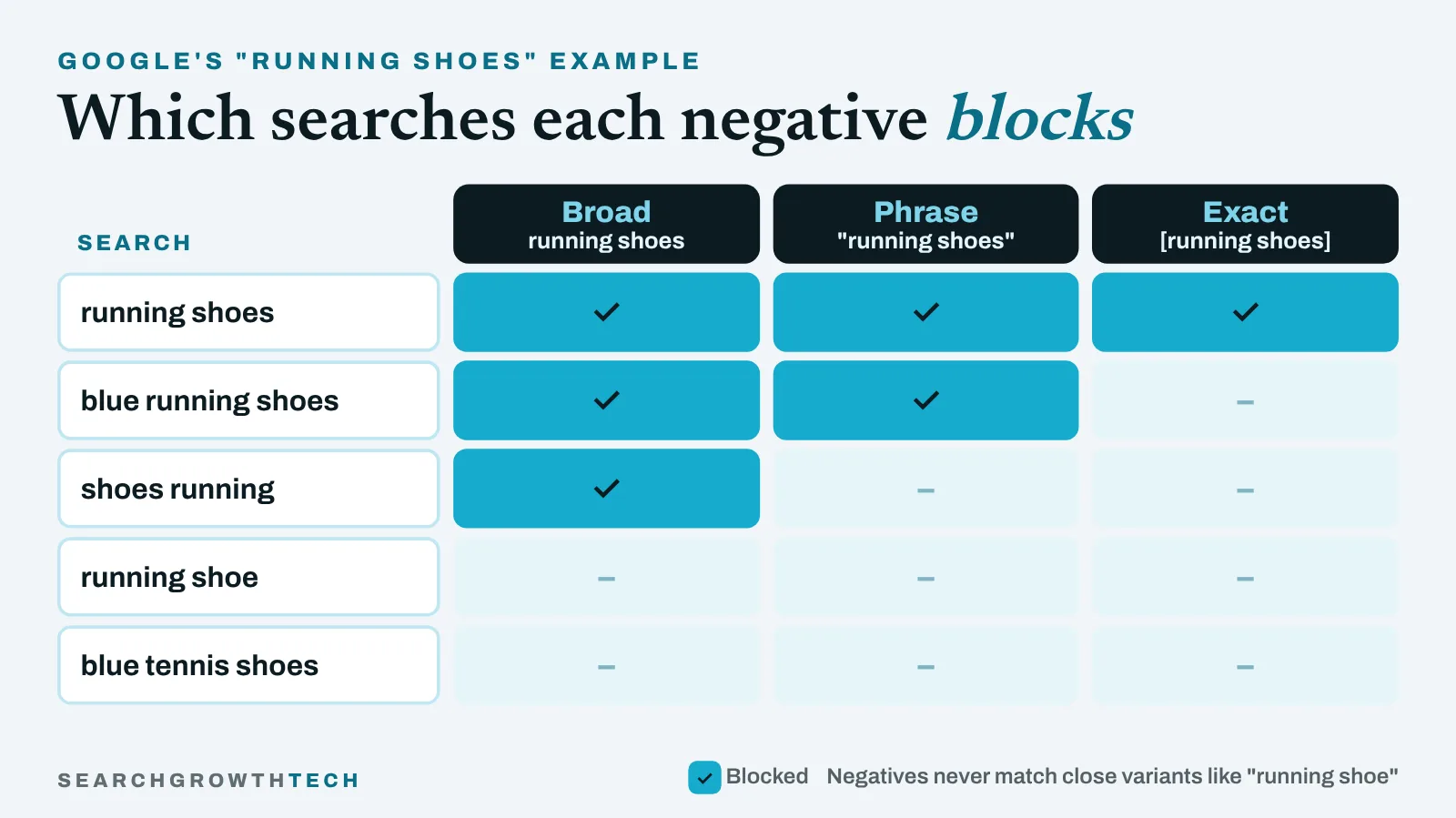
Using Google’s own example, the negative running shoes behaves like this:
| Negative match type | How it blocks | Blocked | Not blocked |
|---|---|---|---|
| Negative broad: running shoes | Search contains all the words, in any order | blue running shoes, shoes running | running shoe, blue tennis shoes |
| Negative phrase: “running shoes” | Words appear in that exact order, extra words allowed | blue running shoes | shoes running, running shoe |
| Negative exact: [running shoes] | Search is exactly those words, nothing more | running shoes | blue running shoes, shoes running |
Two details catch people out:
- Plurals and synonyms are not covered. Excluding “flowers” blocks “red flowers” but not “red flower”. Add both forms, and add synonyms you want to block.
- Casing and misspellings are handled for you. Google says negatives account for these automatically, so you do not need to list every typo.
If you want a refresher on how positive match types expand, see our guide to keyword match types and ad reach.
Where Negatives Live: Account, List, Campaign And Ad Group
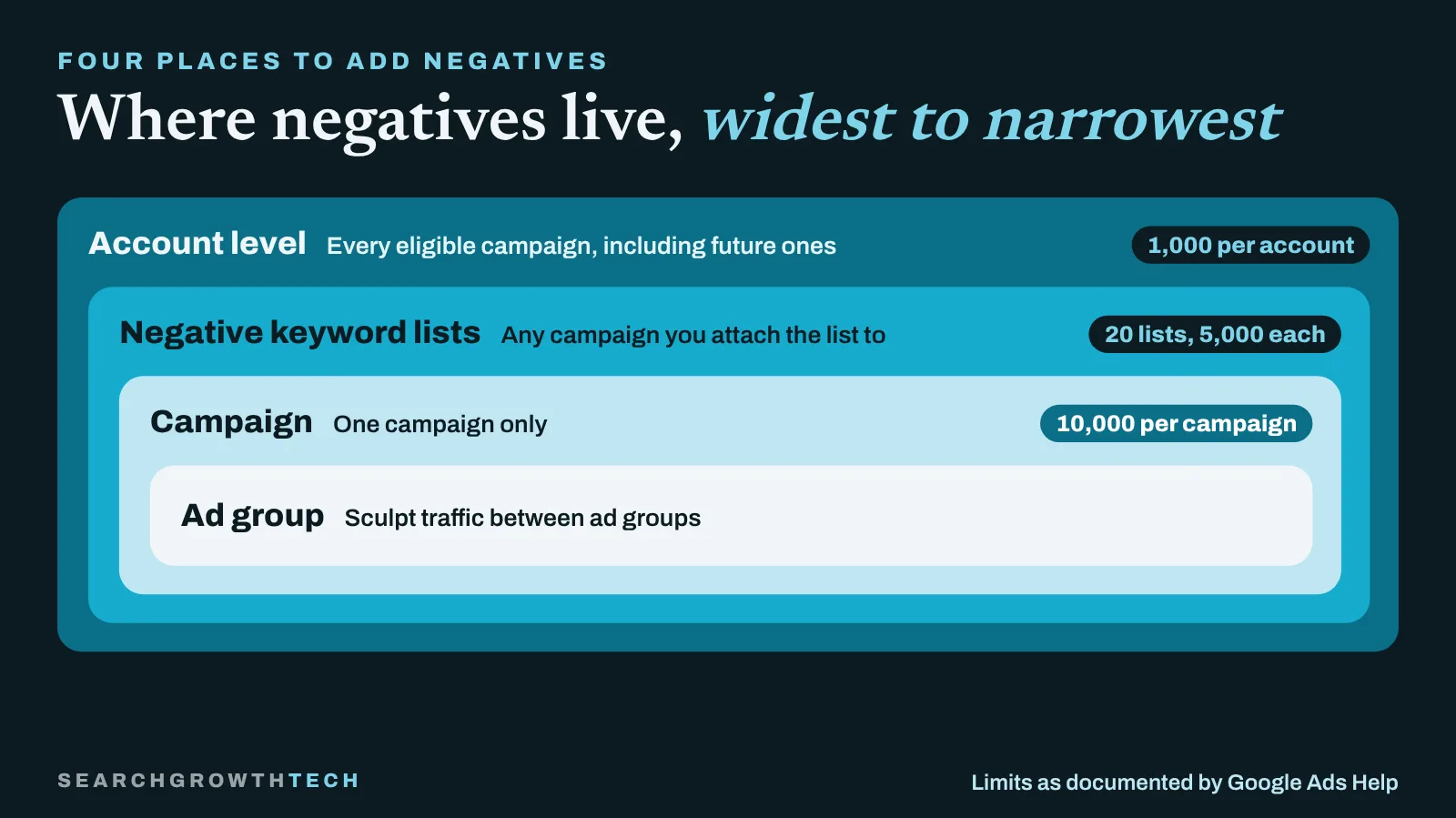
Google Ads gives you four places to add negatives.
| Level | Applies to | Best used for | Documented limit |
|---|---|---|---|
| Account-level negatives | Search and Shopping inventory in Search, Performance Max, Shopping, App, Smart and Local campaigns | Terms you never want anywhere: brand-safety words, “jobs”, “careers”, competitor names you refuse to bid on | 1,000 negatives per account |
| Negative keyword lists (shared) | Any campaign you attach the list to | Themed groups of negatives reused across several campaigns | 20 lists per account, 5,000 negatives per list |
| Campaign negatives | One campaign | Exclusions specific to that campaign’s product or service | 10,000 negatives per campaign |
| Ad group negatives | One ad group | Traffic sculpting between ad groups in the same campaign | No separate limit published |
Account-level negatives sit under Admin > Account settings > Negative keywords. Shared lists live in the Shared library under Exclusion lists, on the Negative keyword lists tab. Campaign and ad group negatives are added from the Negative search keywords tab in the keywords section of your campaign.
Display and Video campaigns are a special case. Negatives there are always treated as broad match and only the first 1,000 are considered. For brand safety on those networks, Google points you to excluded content keywords in content suitability settings instead.
How To Build Negative Keyword Lists From The Search Terms Report
The best negatives come from your own data, not a generic download. Here is the process I use on client accounts:

- Open the search terms report. In your campaign, go to the keywords section and open Search terms. Set a date range of at least 30 days, longer for low-volume accounts.
- Sort by cost. Start with the terms that spent the most and converted the least.
- Find the problem word, not the whole query. If “plumber apprenticeship salary” wasted money, the real negative is probably “apprenticeship” or “salary”, not the full search.
- Choose the narrowest match type that does the job. Use broad for words that are always irrelevant (“salary”). Use phrase or exact for words that are only bad in a certain context.
- Add the negative and save it to a list. Tick the checkbox next to the term, choose Add as negative keyword, and select Save to new or existing list so it can be reused.
- Group lists by theme. Keep separate lists such as “Jobs and careers”, “Free and DIY” and “Wrong locations”.
- Apply lists across campaigns. From Shared library > Exclusion lists, select a list and use Apply to campaigns to attach it where it belongs.
- Repeat on a schedule. Weekly for new or high-spend accounts, monthly once things are stable.
Starter Negative Keyword Ideas By Business Type
Use these as starting points to check against your own search terms, not as lists to paste in blind. A word that is junk for one business is a buyer for another.
| Business type | Common negatives to consider | Watch out for |
|---|---|---|
| Most businesses | jobs, careers, hiring, salary, internship, resume | Recruitment agencies, obviously |
| Premium products | cheap, free, second hand, used, discount code | “Free delivery” or “free quote” searches that do convert |
| Service businesses | DIY, how to, course, training, tutorial | “How to choose a…” searches from real buyers |
| B2B manufacturers | wholesale, for home, toy, images, PDF | Buyers searching for datasheets or spec PDFs |
| Healthcare and dental | salary, course, college, near me jobs, home remedy | Treatment names that sound informational but convert |
Copy-Paste Starter Negative Keyword List
Paste only the groups that fit your business, and check each term against your search terms report first. Plurals are listed separately because negatives don’t match close variants. Terms in quotes are phrase match, because they’re only bad in a certain context.
1. Jobs and careers
2. Free and DIY
3. Courses and research
4. Cheap and second hand (premium sellers only)
5. Images and media
6. Existing customers
Save each group as its own negative keyword list in the Shared library, such as “Jobs and careers” or “Free and DIY”, so you can apply only the ones each campaign needs. Plain “free” is left out on purpose, because searches like “free quote” can convert.
Negative Keywords In Performance Max
Performance Max now supports negative keywords directly. You can add them at campaign level, either to one Performance Max campaign or to all of them, by going to the keywords section, opening the Negative keywords tab and selecting your Performance Max campaign. When you add them there, you can also select an existing negative keyword list.
Account-level negatives also apply to Performance Max automatically, alongside your Search and Shopping campaigns.
- Search and Shopping only. Performance Max negatives apply to Search and Shopping inventory. To keep ads away from irrelevant Display or YouTube content, use excluded content keywords in content suitability settings.
- Use the Performance Max search terms report. Choose Search terms and landing pages for Performance Max from the search terms report to see which searches triggered your ads, then add negatives from what you find.
- Check the impact estimate. Google can show predicted performance before you add a negative to a Performance Max campaign.
Be more conservative here than in Search. Block clear junk and leave the campaign room to find new converting searches.
Common Mistakes That Block Your Own Traffic
These are the errors I see most in account audits:
- Negating a word that is also in your keywords. A broad negative “repair” in a campaign targeting “boiler repair” stops that campaign from showing for its own searches. If you suddenly lose impressions, check this first, and see our guide on why your Google Ads aren’t showing.
- Using broad negatives for context-dependent words. “Free” might be junk in “free software” but valuable in “free consultation”. Use phrase or exact match when context matters.
- Forgetting plurals and variants. Negatives do not cover close variants, so “course” will not block “courses”.
- Putting campaign-specific terms at account level. Account-level negatives hit everything, including future campaigns. Keep them for terms that are wrong everywhere.
- Pasting a huge generic list. Downloaded lists of thousands of negatives often contain words your customers use.
Key Takeaways
- Negative keyword lists let you manage shared exclusions in one place and apply them to many campaigns.
- Negatives do not match close variants, so add plurals and synonyms yourself. Casing and misspellings are handled automatically.
- Google documents 20 lists per account with 5,000 negatives each, 1,000 account-level negatives and 10,000 negatives per campaign.
- Performance Max supports campaign-level and account-level negatives, plus negative keyword lists, for Search and Shopping inventory.
- Build negatives from your search terms report and check them against your active keywords before you save.
FAQs
What Is The Difference Between Account-Level Negatives And A Negative Keyword List?
Account-level negatives apply automatically to Search and Shopping inventory across eligible campaign types in the account. A negative keyword list only affects the campaigns you attach it to, so it gives you more control over where each exclusion applies.
Do Negative Keywords Block Close Variants?
No. Google states that negative keywords won’t match to close variants or other expansions. You need to add singular and plural forms and any synonyms separately, although casing and misspellings are covered.
Can I Add Negative Keywords To Performance Max?
Yes. You can add negatives to one Performance Max campaign or all of them, attach existing negative keyword lists, and use account-level negatives. They apply to Search and Shopping inventory only.
Which Match Type Should I Use For Negatives?
Use negative broad for words that are irrelevant in any context, such as “salary”. Use phrase or exact when a word is only a problem in a specific combination, so you don’t block good searches that contain it.
How Often Should I Review My Search Terms For Negatives?
Weekly is sensible for new campaigns or high-spend accounts. Once the account is stable, a monthly review usually catches new waste. Browse more practical guides in our PPC section.