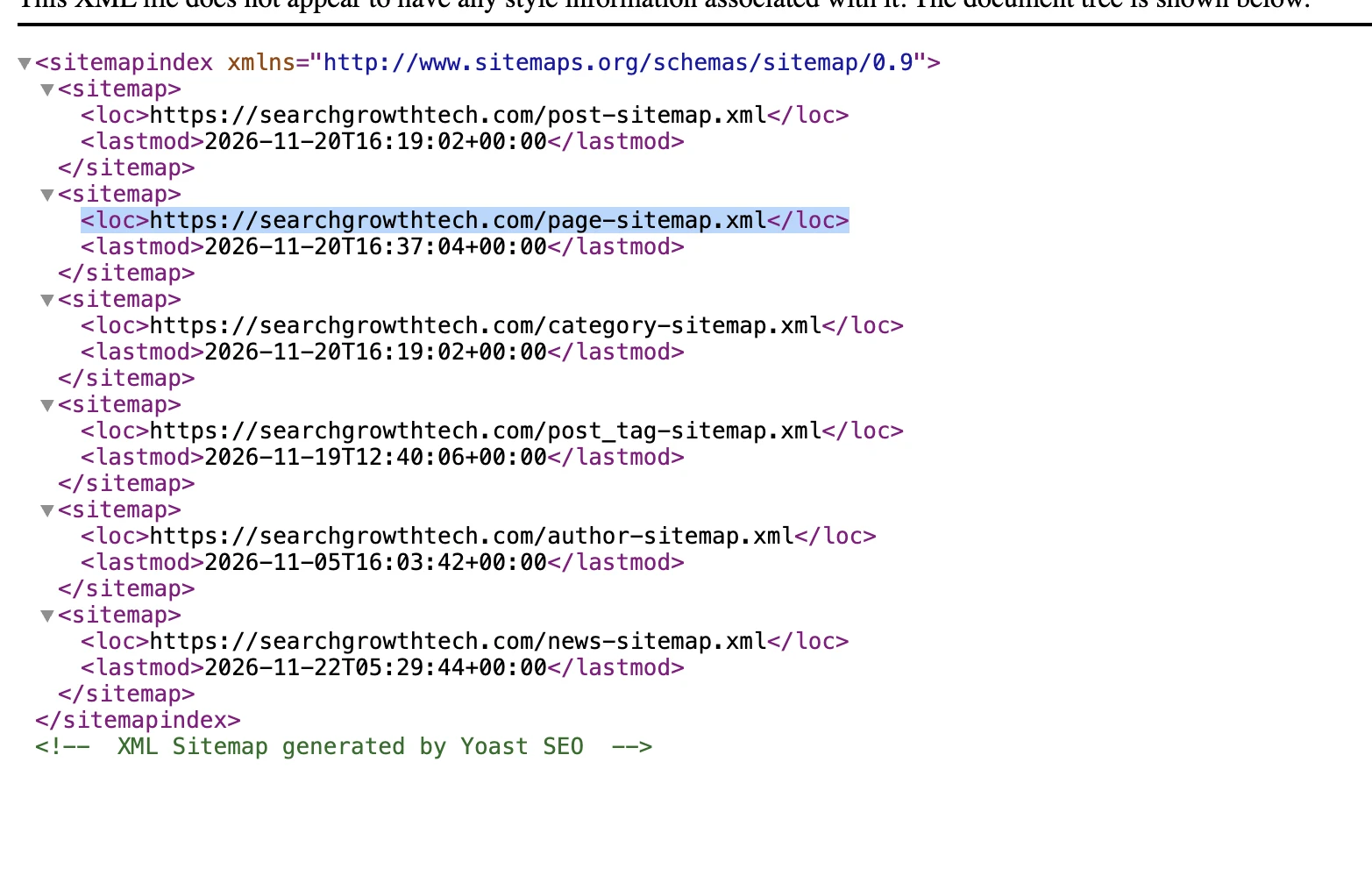
If you updated Yoast SEO this week and opened your sitemap, you probably noticed it no longer looks like a neat table. Instead you see plain code, and the links no longer click through to your pages. Nothing is broken. Yoast SEO 28.9 removed the sitemap stylesheet on purpose, one day after Chrome stopped supporting the technology behind it.
In short: Yoast SEO 28.9, released November 18, 2026, “removes the stylesheet from the XML sitemaps as browsers drop XSLT support,” according to its changelog. Without a stylesheet, every browser shows the raw XML, so links are plain text. Search engines never used the stylesheet. Your sitemap URLs, your Search Console submission and your rankings are unaffected, and Yoast says there is nothing you need to do.
What Changed in Yoast SEO 28.9
Until this release, every Yoast sitemap started with a line pointing to a stylesheet called main-sitemap.xsl. Browsers used that XSLT file to turn the XML into a styled page with a short intro, a table of URLs, last-modified dates and clickable links.
The Yoast SEO 28.9 changelog lists one sitemap change: it “removes the stylesheet from the XML sitemaps as browsers drop XSLT support.” Yoast’s release post explains it in plain terms: “If you open a sitemap in your browser, you’ll now see the plain code that search engines read.” It adds that “search engines still find your pages the same way as before, so there’s nothing you need to do.”
We confirmed this on our own site, which runs Yoast SEO 28.9. Our sitemap index no longer includes a stylesheet line, and the old main-sitemap.xsl file now returns a 404 error.
Why Yoast Removed the Stylesheet
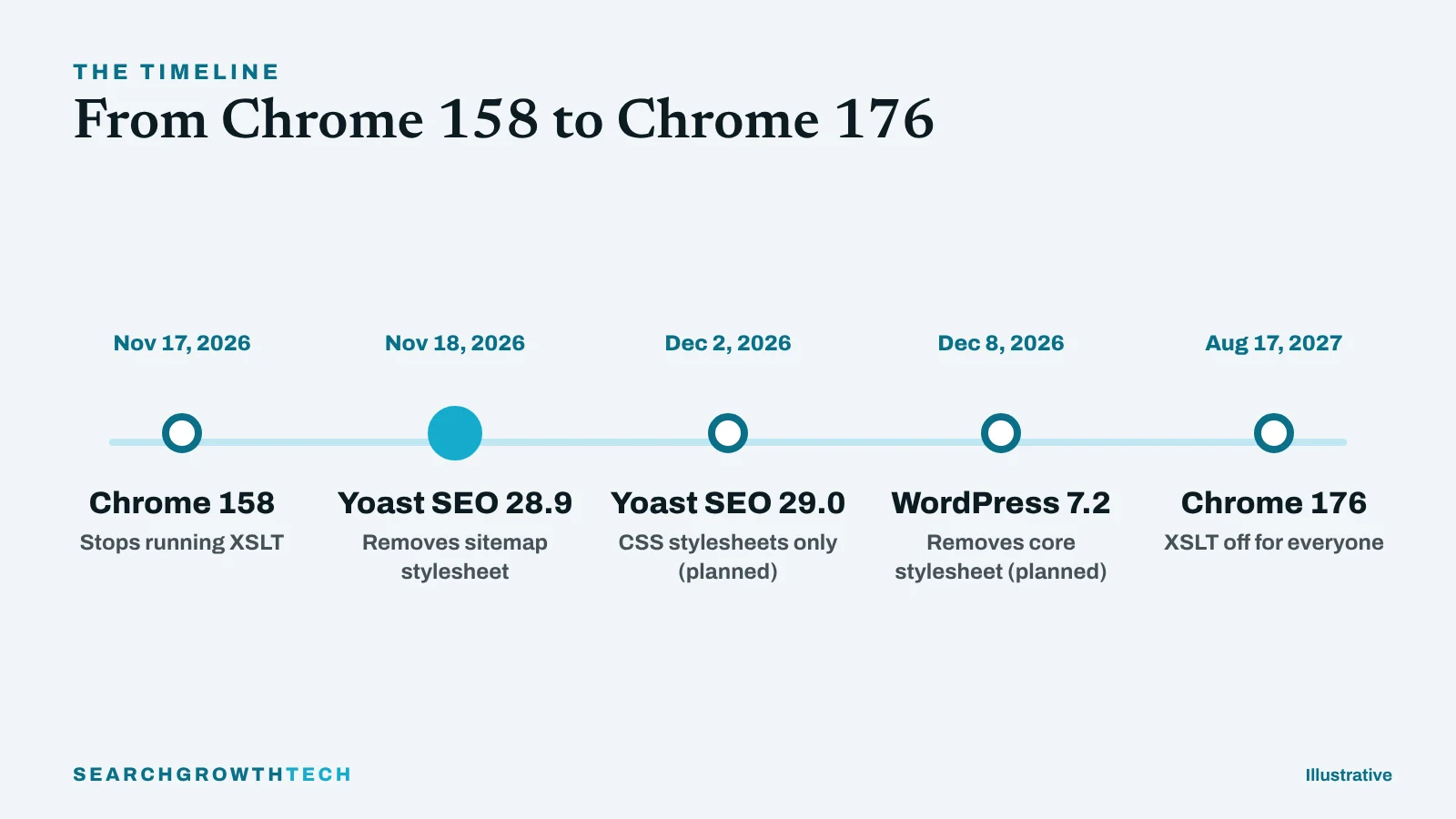
The change follows Chrome. Chrome’s deprecation notice says XSLT support was removed from Chrome 158 on November 17, 2026, for users outside its temporary enterprise policy and origin trial. Those exceptions end with Chrome 176 on August 17, 2027.
Chrome gives two reasons. The first is security: it calls the libxslt library “a complex, aging C/C++ codebase” prone to memory safety bugs. The second is low use: “only about 0.02% of web page loads today actually use XSLT at all.” The same notice says Firefox and Safari have also signaled plans to remove XSLT.
Keeping an XSLT stylesheet would have left Chrome users with an error notice above their sitemap and no styled view. Removing it gives every browser the same plain, readable XML. For the wider story behind the browser change, see our explainer on why Chrome made WordPress sitemaps look broken.
Yoast Update or Chrome? How to Tell
Two different changes produce similar results, and the message at the top of the page tells you which one you have.
| Message you see | What it means | What to do |
|---|---|---|
| “This XML file does not appear to have any style information associated with it.” | The sitemap has no stylesheet line. This is Yoast SEO 28.9 or later. | Nothing. This is the new normal. |
| “This document cannot be formatted as intended. It uses XSLT, which the browser does not support.” | The sitemap still links an XSLT stylesheet, and Chrome 158 refuses to run it. This is typical of older Yoast versions, Rank Math, All in One SEO and WordPress core sitemaps. | Nothing for SEO. The styling fix depends on your plugin. |
| A styled table with clickable links | Your browser still runs XSLT, or the sitemap uses a CSS stylesheet. | Nothing. Expect it to change as other browsers follow Chrome. |
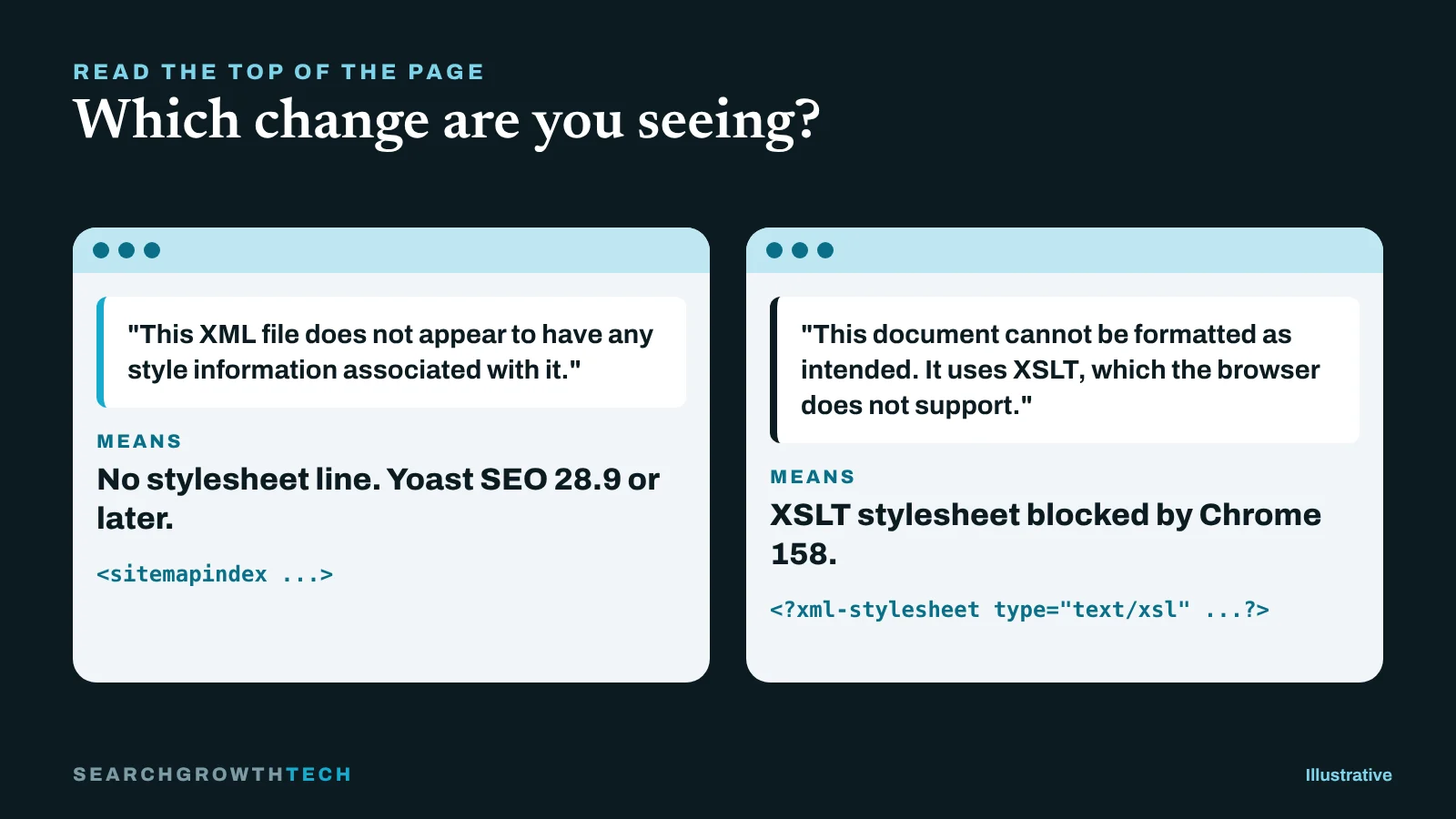
To check the source directly, open your sitemap and view the page source. If the second line starts with <?xml-stylesheet, a stylesheet is still attached. If the file goes straight to <sitemapindex> or <urlset>, it has none.
Does This Affect SEO or Indexing?
No. A sitemap stylesheet only changes how a person sees the file in a browser. Crawlers read the XML tags, such as <loc> and <lastmod>, and ignore the stylesheet. Those tags are exactly the same after the update.
Your sitemap URL also stays the same, so there is no need to resubmit it. For proof, open Google Search Console, go to Indexing and then Sitemaps, and confirm your sitemap shows “Success” with a recent read date. Search Engine Journal reached the same conclusion about the Chrome change: it is a visual change only.
What Each Sitemap Source Is Doing
| Sitemap source | Current status |
|---|---|
| Yoast SEO | Version 28.9 (November 18, 2026) removed the stylesheet. Sitemaps show plain XML in all browsers. |
| WordPress core (wp-sitemap.xml) | Still links an XSLT stylesheet. WordPress 7.2, planned for December 8, 2026, removes it. |
| Rank Math | Version 1.0.282 still links an XSLT stylesheet, with no replacement announced as of mid-November. |
| All in One SEO | Version 5.0.5.1 still links an XSLT stylesheet, with no replacement announced as of mid-November. |
Plugin status reflects public changelogs and reporting as of November 18 to 20, 2026, and may change with new releases.
Will the Clickable Table Come Back?
Partly, and not as before. Yoast’s plugin team opened a GitHub task to replace the XSLT file with a CSS stylesheet that recreates the centered layout and striped rows. CSS stylesheets for XML are not affected by Chrome’s change. The same task lists what a CSS version cannot do: links stay plain text, the “This XML Sitemap contains N URLs” line is removed, dates show as raw timestamps and per-row image counts disappear.
So even if styling returns, clickable links will not. If you or your clients rely on clicking through a sitemap, a browser extension or an HTML sitemap page is the better long-term answer.
What to Do Now
- Leave the sitemap alone. Do not disable Yoast sitemaps or resubmit a different URL. The plain view is expected.
- Do not roll back to an older Yoast version. Yoast SEO 28.9 also includes a security fix that stops head REST endpoints from exposing the content of private posts and pages. Rolling back to get the table back would bring that issue back too, and Chrome would still refuse the old stylesheet.
- Confirm health in Search Console. Check the Sitemaps report for a “Success” status.
- Use a viewer when you need to browse. Our guide to viewing XML sitemaps in Chrome after XSLT removal covers extensions that make sitemaps searchable and clickable again.
- Brief your team and clients. With Google’s November 2026 core update rolling out this month, a “broken sitemap” report is easy to misread. One line covers it: the sitemap looks different, and search engines read it the same way.
- Developers: check custom stylesheets. According to a note from Yoast’s plugin lead, from Yoast SEO 29.0, planned for December 2, sitemaps will only print a stylesheet line of type
text/css. Any XSL stylesheet added through thewpseo_stylesheet_urlfilter will be skipped.
Key Takeaways
- Yoast SEO 28.9 removed the XML sitemap stylesheet on November 18, 2026, so sitemaps now show plain code.
- The change followed Chrome 158, which stopped running XSLT on November 17, 2026.
- Google and other search engines read the XML, so indexing and rankings are not affected.
- A future CSS stylesheet may bring back some styling, but links will not be clickable.
- Keep 28.9 for its security fix, and use Search Console or a viewer to check sitemaps.
For more updates like this, follow our SEO News and WordPress coverage.
FAQs
Why does my Yoast sitemap show code instead of a table?
Yoast SEO 28.9 removed the stylesheet that turned the XML into a table, because browsers are dropping XSLT support. Without it, browsers show the raw XML.
Why are the links in my sitemap no longer clickable?
The clickable links came from the XSLT stylesheet. Plain XML has no links, so browsers show the URLs as text.
Is my sitemap broken after the Yoast update?
No. The sitemap URL and its contents are unchanged. Check the Sitemaps report in Google Search Console for a “Success” status to confirm.
Do I need to resubmit my sitemap to Google?
No. The URL has not changed, and Google reads the same XML as before.
Can I get the old Yoast sitemap view back?
Not in Chrome. Older Yoast versions use XSLT, which Chrome 158 no longer runs. A future CSS stylesheet may restore some styling, but not clickable links.