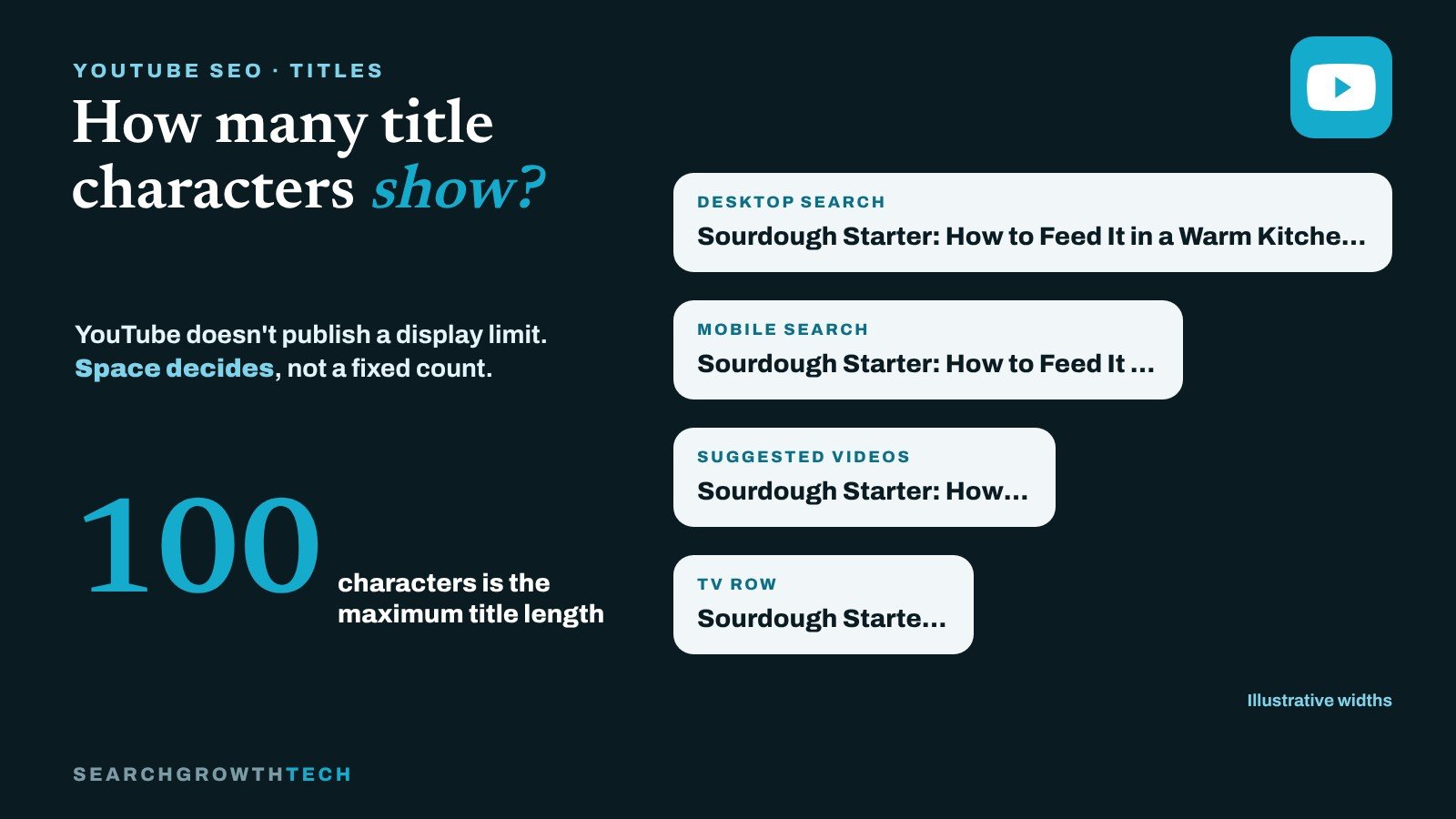
Search “YouTube title length” and you’ll find two camps. One says keep titles under 60 characters. The other says 70 is the magic number. Both are written as if YouTube published a rule. It didn’t. YouTube sets a hard limit on how long a title can be, but it doesn’t publish how many characters are shown, because that depends on the device, the screen width and where the title appears.
In short: a YouTube title can be up to 100 characters, according to YouTube’s own API documentation, and can’t contain the < or > characters. YouTube doesn’t publish a display limit. Titles are cut by available space, not by a fixed count, so they’re shorter in some places (suggested videos on a phone, TV rows) and longer in others (YouTube search on desktop, the watch page). The “60 vs 70 characters” debate is two rough estimates of the same thing. The practical rule: put the words that matter in the first 40 to 50 characters, and make sure the title still makes sense if the rest is cut off. Facts below were checked against YouTube’s developer documentation and Help Center on 5 November 2026.
The Official Numbers
| Field | Limit | Source |
|---|---|---|
| Video title | 100 characters. No < or > | YouTube Data API documentation |
| Video description | 5,000 bytes. No < or > | YouTube Data API documentation |
| Tags field | 500 characters in total | YouTube Data API documentation |
| Characters shown in search | Not published | No YouTube source |
Every “YouTube shows X characters” figure you see is an observation by a third party, usually on one device at one point in time.
Why the 60 vs 70 Advice Conflicts
Titles Are Cut by Width, Not Character Count
Letters take different amounts of space. “Illuminating” is narrower than “WOMBAT MEMES” with the same number of characters. Capital letters, wide letters like W and M, emoji and non-Latin scripts all change how much fits on a line. A fixed character count can only ever be an average.
Different Surfaces Show Different Amounts
| Where the title appears | How much space it gets |
|---|---|
| YouTube search, desktop | Generous. Long titles often show in full |
| YouTube search, mobile | Usually wraps across a couple of lines, then truncates |
| Home feed | Limited lines under the thumbnail |
| Suggested videos beside the player | Tight. Long titles get cut early |
| TV app rows | Often the tightest |
| Watch page | Usually shows the full title |
| Google search results | Google rewrites and truncates titles by pixel width |
“60 characters” and “70 characters” are both reasonable guesses for a middle-sized surface. Neither is right everywhere, and layouts change when YouTube redesigns its apps.
How to Write Titles That Survive Truncation
Front-Load the Search Phrase
Put the words someone would type at the start. “Sourdough Starter: How to Feed It (Ratios Explained)” keeps the topic visible even if the bracket is cut.
Make the First 40 to 50 Characters a Complete Promise
Read only the first half of your title. If it doesn’t tell a viewer what they get, rewrite it. Use the second half for detail, not the core message.
Don’t Hide the Payoff at the End
“I Tried Every Budget Mic and the Winner Is…” loses the point on small screens. Lead with what’s being compared or answered.
Keep the Thumbnail and Title Working Together
If the thumbnail says the hook, the title can say the topic. Repeating the same words in both wastes space.
Avoid Padding
Words like “Ultimate”, “Best Ever” or the year can push the useful part out of view. Use them only when they matter to the searcher.
Examples: Long vs Front-Loaded
| Weaker | Stronger |
|---|---|
| So I Finally Decided to Test How Long an iPhone Battery Lasts in 2026 | iPhone Battery Life Test 2026: How Long It Really Lasts |
| This Is the Easiest Way I Have Found to Clean Cast Iron | How to Clean Cast Iron (Easiest Way, No Soap) |
| You Won’t Believe What Happened When We Tried This Budget Drone | Budget Drone Review: Worth It Under $100? |
Does Title Length Affect Rankings?
YouTube doesn’t name title length as a factor. It does say search looks at how well the title matches the query. A short title can miss words people search. A long title can bury them. Aim for the shortest title that includes the main phrase and a clear reason to click.
Semrush’s 2021 study of top YouTube results found titles were often around eight words. That’s a pattern from that sample, not a rule. For more on what YouTube actually ranks on, see YouTube ranking factors 2026.
Titles in Other Languages
If you translate titles in YouTube Studio’s Languages section, YouTube says search can use those translated titles to match viewers’ languages. Check each translation for truncation separately. Hindi, Tamil and other scripts take different widths than English. Our auto-dubbing guide for Indian creators covers translated metadata.
Shorts Titles
Shorts titles can show over the video in the Shorts player, where space is tight and text sits on top of the image. Keep the key phrase very early and test how it looks on a phone before publishing.
How to Check Your Title Before Publishing
- Count characters to stay under 100.
- Read the first 40 to 50 characters on their own.
- Preview on a phone by checking a similar video in search and suggested videos.
- Check Google’s view by searching your topic on Google and seeing how video results are shown.
- Track impressions click-through rate in YouTube Studio after publishing, and test a new title if it’s low.
Quick Reference
| Question | Answer |
|---|---|
| Maximum title length | 100 characters |
| Characters YouTube shows | Not published. Varies by surface |
| Safe zone for key words | First 40 to 50 characters |
| Is 60 or 70 correct? | Both are estimates. Neither is official |
| Characters not allowed | < and > |
Title Formulas That Front-Load the Topic
These patterns keep the searchable part first and the hook second. Swap in your own topic:
| Formula | Example | Best for |
|---|---|---|
| [Topic]: [Specific promise] | Sourdough Starter: How to Feed It in a Warm Kitchen | Tutorials |
| How to [task] ([qualifier]) | How to Clean Cast Iron (No Soap, 5 Minutes) | How-to searches |
| [Product] Review: [verdict or question] | Budget Drone Review: Worth It Under $100? | Reviews |
| [A] vs [B]: [decision] | Braces vs Clear Aligners: Which Costs Less? | Comparisons |
| [Topic] Explained in [time] | Inflation Explained in 3 Minutes | Explainers |
| [Number] [things] for [audience] | 7 Excel Shortcuts for Accountants | Lists |
Testing Titles After You Publish
YouTube Studio’s impressions click-through rate shows how often people who saw your thumbnail and title clicked. A low rate compared with your other videos is a sign to test a new title. Change one thing at a time: the title or the thumbnail, not both, so you know which made the difference. Give each version enough impressions before judging it, and compare against your own channel’s typical rate rather than outside benchmarks. Keep the new title accurate. A title that wins clicks but loses viewers early can hurt satisfaction, which YouTube measures.
When Not to Change a Title
- When a video is already bringing steady search traffic for its current wording.
- When the change would make the title less accurate.
- When you haven’t checked the search terms report to see which words people use to find it.
Key Takeaways
- YouTube titles can be up to 100 characters.
- YouTube doesn’t publish how many characters are displayed.
- Truncation depends on screen width and placement, not a fixed count.
- Put the search phrase and promise in the first 40 to 50 characters.
- Judge titles by impressions click-through rate, not by a character rule.
FAQs
What Is the Maximum YouTube Title Length?
100 characters, according to YouTube’s API documentation.
How Many Characters of a YouTube Title Are Shown?
YouTube doesn’t publish a number. It depends on device, screen size and where the title appears.
Should YouTube Titles Be 60 or 70 Characters?
Neither is an official rule. Write a title whose first 40 to 50 characters make sense on their own.
Do Longer Titles Rank Better on YouTube?
YouTube doesn’t name title length as a factor. Relevance to the search matters more.
Can I Use Emoji in YouTube Titles?
Yes, but they take space and can push key words out of view on small screens.
Can I Change a YouTube Title After Publishing?
Yes. You can edit it in YouTube Studio at any time.