OpenAI now lets businesses claim their profile in ChatGPT. The feature, called Businesses in ChatGPT, launched in beta on November 10, 2026. Through a new Business Hub, owners can verify their business, update its details, add product feeds and see how often ChatGPT mentions them.
This guide walks through the claim process using OpenAI’s own documentation, and explains what claiming does and does not change about how your business shows up in ChatGPT answers.
In short: Open Business Hub from the ChatGPT sidebar, search for your business and verify it by business phone, business email, a DNS TXT record or Shopify. After OpenAI approves the claim, complete identity verification with Persona to edit your details, connect a product feed, view insights and get the blue check. You don’t need an Ads account or Enterprise agreement to claim, but OpenAI says claiming “does not guarantee higher placement or sales.” Business Agents are limited to eligible U.S. ecommerce and online service businesses for now.
What Is Businesses in ChatGPT?
Businesses in ChatGPT is OpenAI’s new way for companies to manage how they appear in ChatGPT. OpenAI says it gives businesses “a new way to connect with the 1.2 billion people who use ChatGPT each week.”
It has three parts:
- Business Hub, where you claim your business, manage its information and add product feeds with pricing and availability.
- Insights, which show aggregated mentions, website clicks and discovery topics from ChatGPT conversations.
- Business Agents, a separate, clearly labeled chat that answers customer questions using information your business provides.
You can read OpenAI’s overview on its Businesses in ChatGPT page.
Who Can Claim a Business in ChatGPT
You can claim a business if you own it or are authorized to represent it. OpenAI says you don’t need an Ads account or a ChatGPT Enterprise agreement to claim an eligible business.
Eligibility depends on the business’s location and type:
- Online businesses can claim an existing listing where ChatGPT is available. If no listing exists, eligible online businesses may see an option to add one.
- Local stores and restaurants can currently claim only an existing U.S. listing.
- Shopify merchants can connect their store from Business Hub or the Shopify admin to streamline verification.
- OpenAI Enterprise customers and advertisers can work with their OpenAI representative to claim their business.
OpenAI’s business page adds that claiming is “initially available to eligible businesses with a website.”
How to Claim Your Business in ChatGPT: Step by Step
Here’s the process as OpenAI’s Help Center describes it:
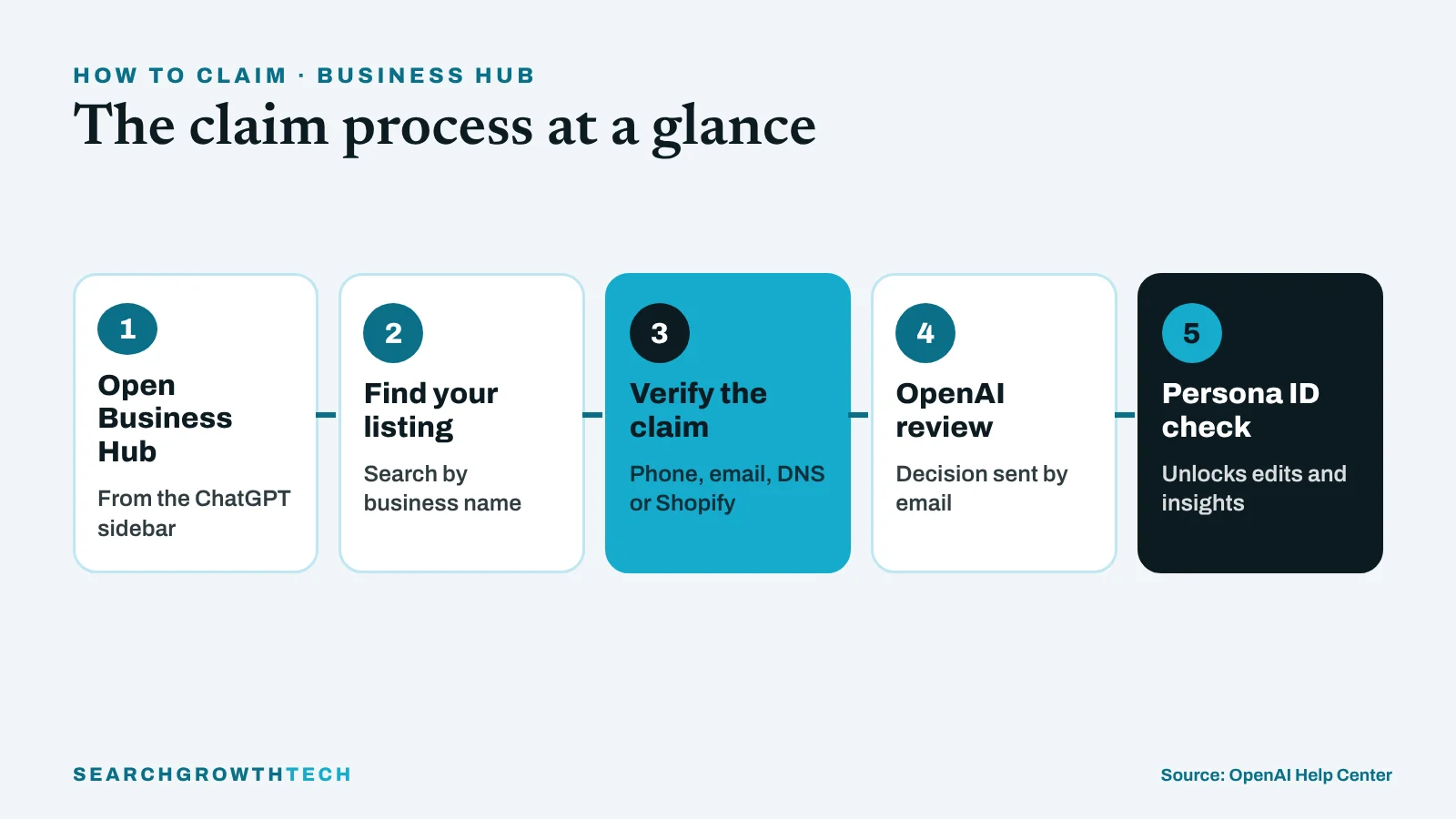
- Open Business Hub. Sign in to ChatGPT and open Business Hub from the sidebar.
- Search for your business by name and select the listing that matches it.
- Confirm the ChatGPT account you’ll use to manage the business. Use an account you plan to keep, since teammates and agencies are added from the admin’s account later.
- Verify your claim using one of the methods offered for your business (see the table below).
- Wait for approval. OpenAI reviews the claim and emails you its decision or a request for more information. You can cancel the claim while it’s under review.
- Complete Persona verification. This identity check unlocks editing, product feeds, insights and Business Agents.
- Update your business information once both approvals are in place.
Verification Methods
| Method | How it works |
|---|---|
| Business phone | Choose a text message or automated call, then enter the code sent to the number shown. |
| Business email | Enter the code sent to the email address associated with your business. |
| Website domain | Add the TXT record shown in ChatGPT to your domain’s DNS settings, then select Verify domain. DNS changes can take time to appear. |
| Shopify store | Connect Shopify, review the permissions and sign in to the store you’re claiming. |
Not every method appears for every business. If your listing shows Contact support, it’s locked and you’ll need to request access. If someone else has already claimed it, open the profile, select the three-dot menu and choose Dispute ownership.
For the DNS option, copy the record type, name or host, and value exactly. If a developer or hosting company manages your domain, ask them to add it.
What It Looks Like in ChatGPT: Real Screenshots
We walked through Business Hub ourselves to show each screen. SearchGrowthTech had no existing listing, so these screenshots follow the path for adding a new online business. We stopped at the DNS step and didn’t submit a claim.
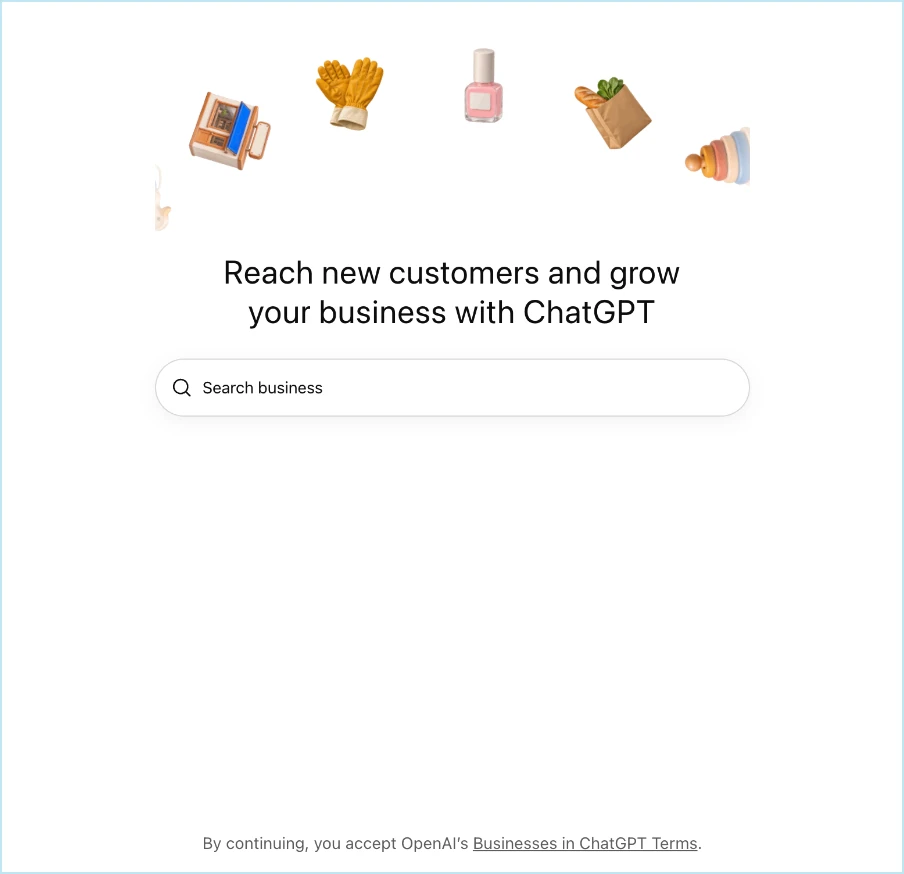
1. Open Business Hub and search for your business. Business Hub opens with a single search box. Note the line at the bottom: by continuing, you accept OpenAI’s Businesses in ChatGPT Terms.
2. Pick your listing, or create one. Matching businesses appear below the search box. If yours isn’t listed and it’s an eligible online business, you’ll see a Create option at the top.

3. Select Get started. ChatGPT summarizes what you get: insights on how your business shows up, a place to keep your products and details current, and a business agent.

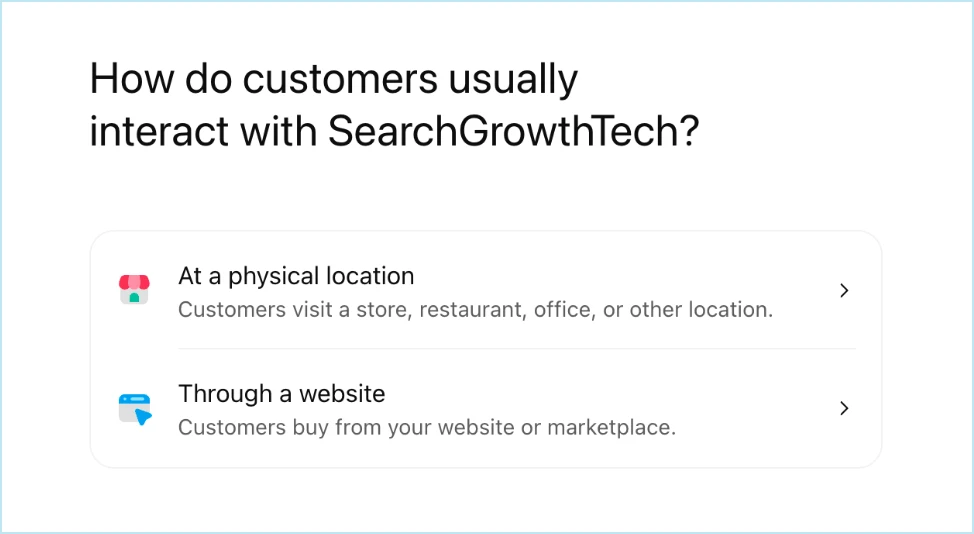
4. Choose how customers reach you. Pick At a physical location for a store, restaurant or office, or Through a website if customers buy from your site or a marketplace.
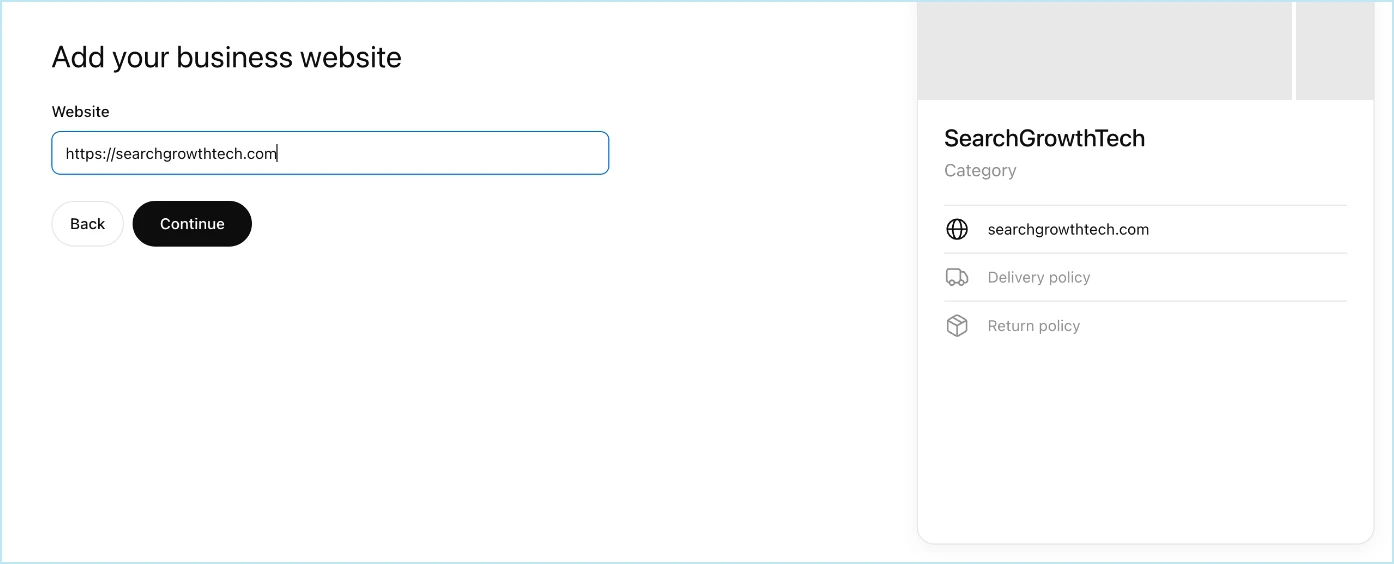
5. Add your website. Enter your full website address. The profile preview on the right updates as you go and shows the fields you can complete later, such as category, delivery policy and return policy.
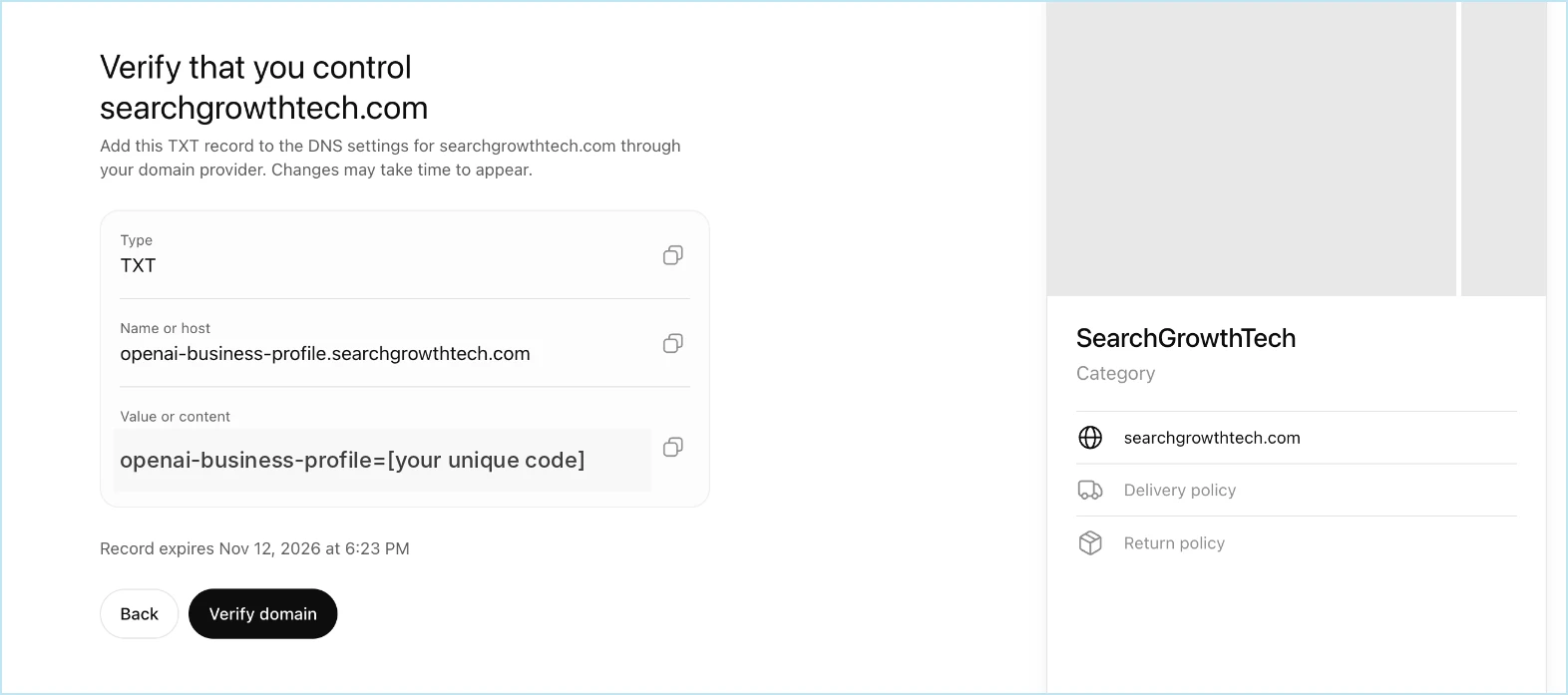
6. Verify that you control the domain. For our site, ChatGPT asked for a DNS TXT record. Copy the type, host and value into your domain provider’s DNS settings, then select Verify domain. The record has an expiry time, so add it straight away.
Claim Approval vs Persona Verification
Claiming and identity verification are two separate approvals, and most features need both.
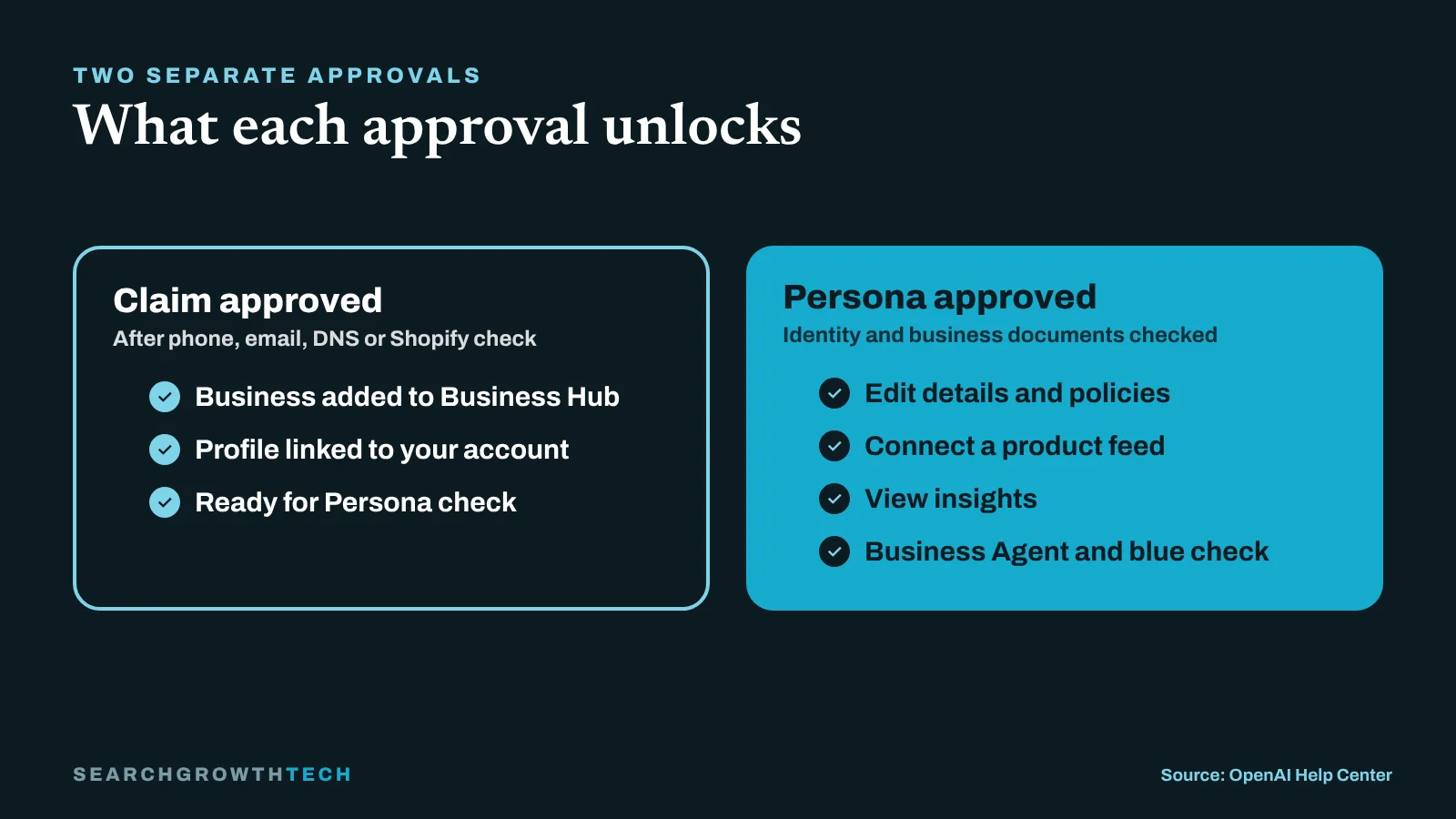
OpenAI uses Persona for identity checks. You may need a government-issued ID, business registration information and proof that you’re authorized to represent the business. The business name, address and any registration or tax number should match your official records, or the check may fail.
The blue check is where OpenAI’s pages differ slightly. The business page says a blue check appears “to show it’s been claimed.” The Help Center is more specific: “Claiming your business alone doesn’t give its profile a verified badge.” The badge appears after your Persona verification is approved.
One more detail worth knowing before you start: if you use Persona to create a new profile, OpenAI’s approval publishes it automatically. Only unpublished drafts can be deleted, and OpenAI Support can’t unpublish or hide a published profile.
What You Can Update After Approval
After both approvals, open your profile in the Business tab to update:
- Website
- Business description
- Product or service category
- Logo and cover photo
- Delivery policy and return policy
Retailers can also connect a product feed, either from Shopify or as a CSV that follows OpenAI’s product feed specification, to share prices and availability.
OpenAI reviews changes before publishing them, so updates can take time to appear. It also notes that “ChatGPT may also use other sources when answering questions about your business.” Your website and other listings still matter.
Business Hub Insights: What the Numbers Mean
Insights cover the past 28 days. OpenAI defines each metric carefully, and the definitions matter:
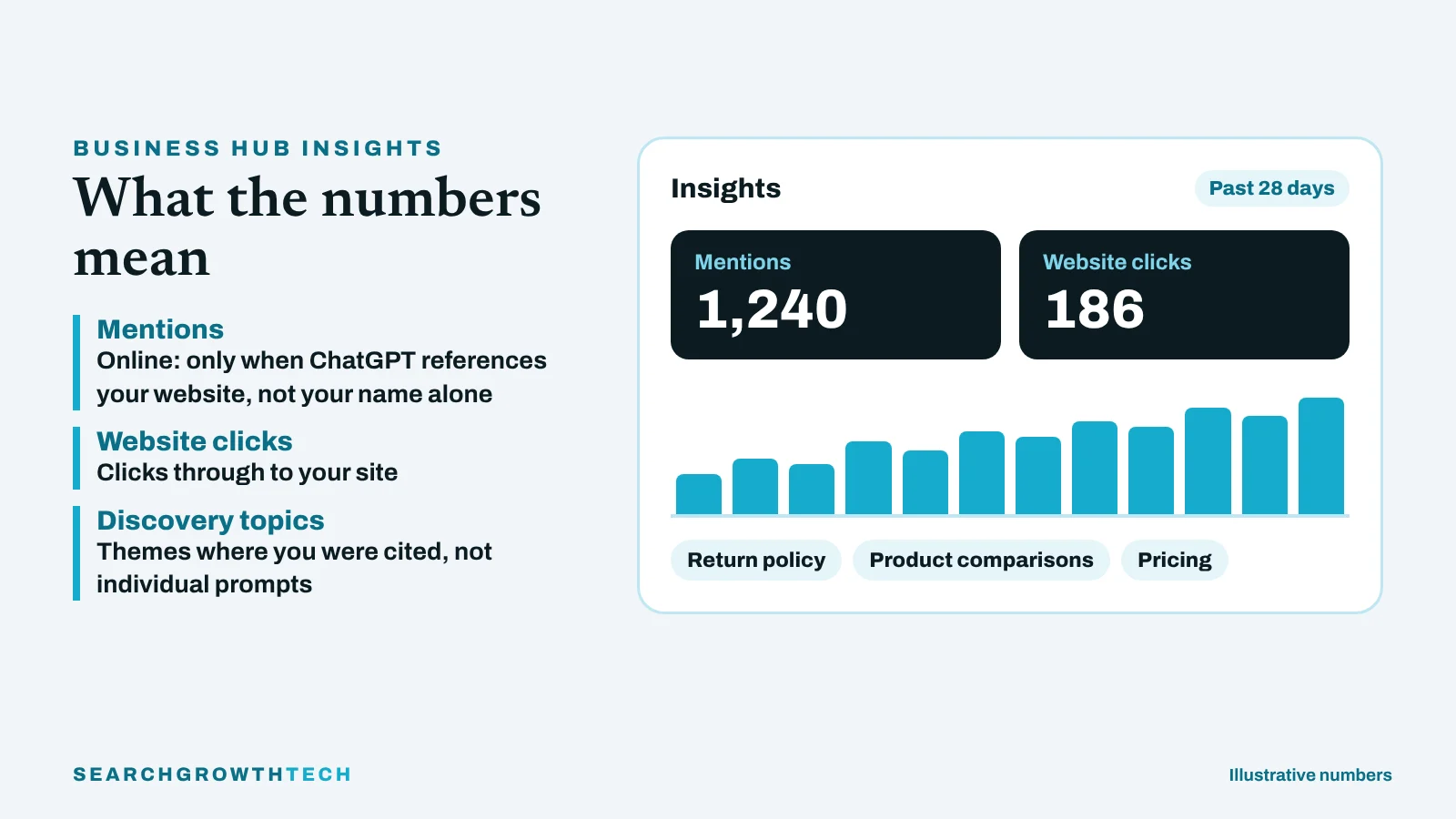
- Mentions. For an online business, a mention counts only when ChatGPT references your website. Your brand name alone doesn’t count. For a local business, a mention counts when ChatGPT shows a result for that location.
- Website clicks. How often people click through to your site.
- Discovery topics. Common themes in answers that mentioned or cited your business. They don’t reveal individual prompts.
Businesses never see individual conversations, including chats with their Business Agent. A blank metric doesn’t necessarily mean zero activity. It can mean the data hasn’t reached the reporting threshold yet.
For SEO teams, this is the closest thing ChatGPT has offered to a Search Console-style report. Discovery topics in particular show which kinds of questions lead ChatGPT to cite your website.
Business Agents: Who Can Use Them
A Business Agent is a chat customers can open from your ChatGPT profile to ask about your products and policies. OpenAI says the conversation is “clearly labeled, separate from the customer’s original ChatGPT conversation, and distinct from ChatGPT’s independent answers.”
- Availability: eligible ecommerce and online service businesses in the U.S. with a website, subject to the Business Agents Policy.
- Setup: requires an approved claim and Persona verification. Review the information the agent uses, test it with common customer questions, then publish.
- Limits: the agent can explain products and policies and link to your website, but it can’t complete purchases, make bookings or check orders.
- Ads: businesses can sponsor their agent and use it as the destination for ChatGPT Ads. Sponsored placements are labeled separately.
Claiming, publishing an agent and advertising are separate. You can claim and manage your profile without doing either of the other two.
Does Claiming Help You Get Cited in ChatGPT?
Not directly. OpenAI is clear on this point: claiming “doesn’t guarantee increased visibility or give you direct control over ChatGPT’s independent recommendations,” and “Advertising doesn’t influence ChatGPT’s independent answers.”
What claiming does give you is accurate information and data. Correct details, policies and product feeds help ChatGPT answer questions about your business correctly. Insights show whether your website is being cited at all.
Getting cited still depends on the content ChatGPT finds about you. Our guides on how to get featured in AI search and how reviews affect AI search visibility cover that side. If your mentions drop, see how to recover lost AI search visibility.
Common Problems and Fixes
| Problem | What to do |
|---|---|
| Listing shows “Contact support” | The listing is locked. Select Contact support to request access. |
| Business already claimed by someone else | Open the profile, select the three-dot menu, then Dispute ownership and verify with Persona. |
| Can’t find your business | Eligible online businesses may see an option to add it. Local stores and restaurants can only claim an existing U.S. listing. |
| Persona check failed | Follow the email instructions and resubmit with details that match your official records. |
| No option to create an agent | Check that Persona verification is approved and that your business meets the location, type and industry requirements. |
| Changes not showing yet | OpenAI reviews updates before publishing, and answers may still draw on other sources. |
Key Takeaways
- Businesses in ChatGPT launched in beta on November 10, 2026, through Business Hub.
- Verify your claim by business phone, business email, DNS TXT record or Shopify.
- Persona identity verification unlocks editing, product feeds, insights, Business Agents and the blue check.
- Local stores and restaurants can claim only existing U.S. listings for now.
- Claiming doesn’t guarantee more visibility, and ads don’t affect ChatGPT’s independent answers.
FAQs
Do I Need to Pay or Advertise to Claim My Business?
OpenAI says you don’t need an Ads account or a ChatGPT Enterprise agreement to claim an eligible business. Advertising and sponsored Business Agents are separate.
How Do I Verify My Business in ChatGPT?
Use one of the methods offered for your listing: business phone, business email, a DNS TXT record on your website domain, or your Shopify store. Then complete identity verification with Persona.
Can a Business Outside the U.S. Claim Its Profile?
Online businesses can claim where ChatGPT is available and the required verification is supported. Local stores and restaurants can currently claim only existing U.S. listings, and Business Agents are U.S.-only.
Can an Agency Manage a Client’s ChatGPT Profile?
Yes. The admin who claimed the business can add teammates and grant an agency access in Business Hub. Each person uses their own ChatGPT account.
Will Claiming My Business Make ChatGPT Recommend It More?
No. OpenAI says claiming doesn’t guarantee increased visibility. It lets you manage your information and see insights.
Sources: OpenAI announcement, OpenAI Help Center, Businesses in ChatGPT. More coverage in our AI Search section.