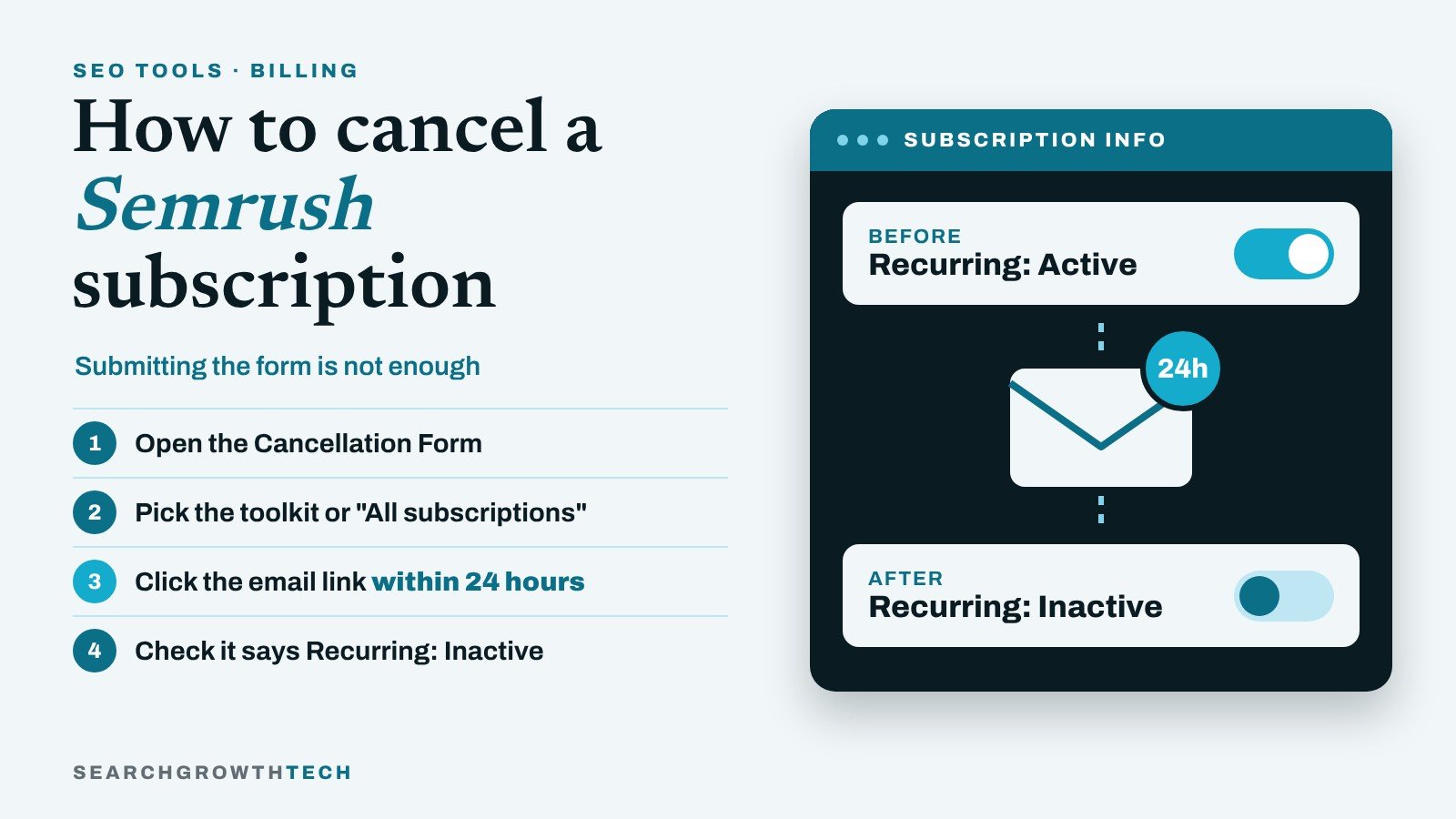
Cancelling Semrush looks simple: find the form, submit it, done. But a lot of people who “cancelled” still get billed the next month. The most common reason is a step most guides skip: Semrush sends a confirmation email, and if you don’t click the link inside it within 24 hours, the cancellation is never processed.
In short: to cancel a Semrush subscription, log in to the account that pays for it, open the Cancellation Form (directly, or from Subscription Info by clicking Contact us next to Recurring: Active), choose which toolkit to cancel or All Semrush subscriptions, and submit. Then click the confirmation link Semrush emails you within 24 hours. You’re done when Subscription Info shows Recurring: Inactive. Cancelling does not trigger a refund. You must ask for one, and month-to-month plans are not eligible for the standard 7-day money-back guarantee. Steps and policies below were checked against Semrush’s help center on 5 November 2026.
Before You Cancel: A 5-Minute Checklist
- Note your renewal date in Subscription Info. Cancelling stops the next renewal, not the current period you’ve paid for.
- Export anything you need. Position Tracking history, Site Audit results and keyword lists in projects can be lost after cancellation (see “What Happens After You Cancel”).
- Check who owns the subscription. You must be logged in to the account linked to the subscription.
- List your add-ons and apps. They are cancelled differently from toolkits.
- Decide whether you want a refund. If you do and you’re eligible, you have to ask for it in the form.
How to Cancel a Semrush Subscription, Step by Step
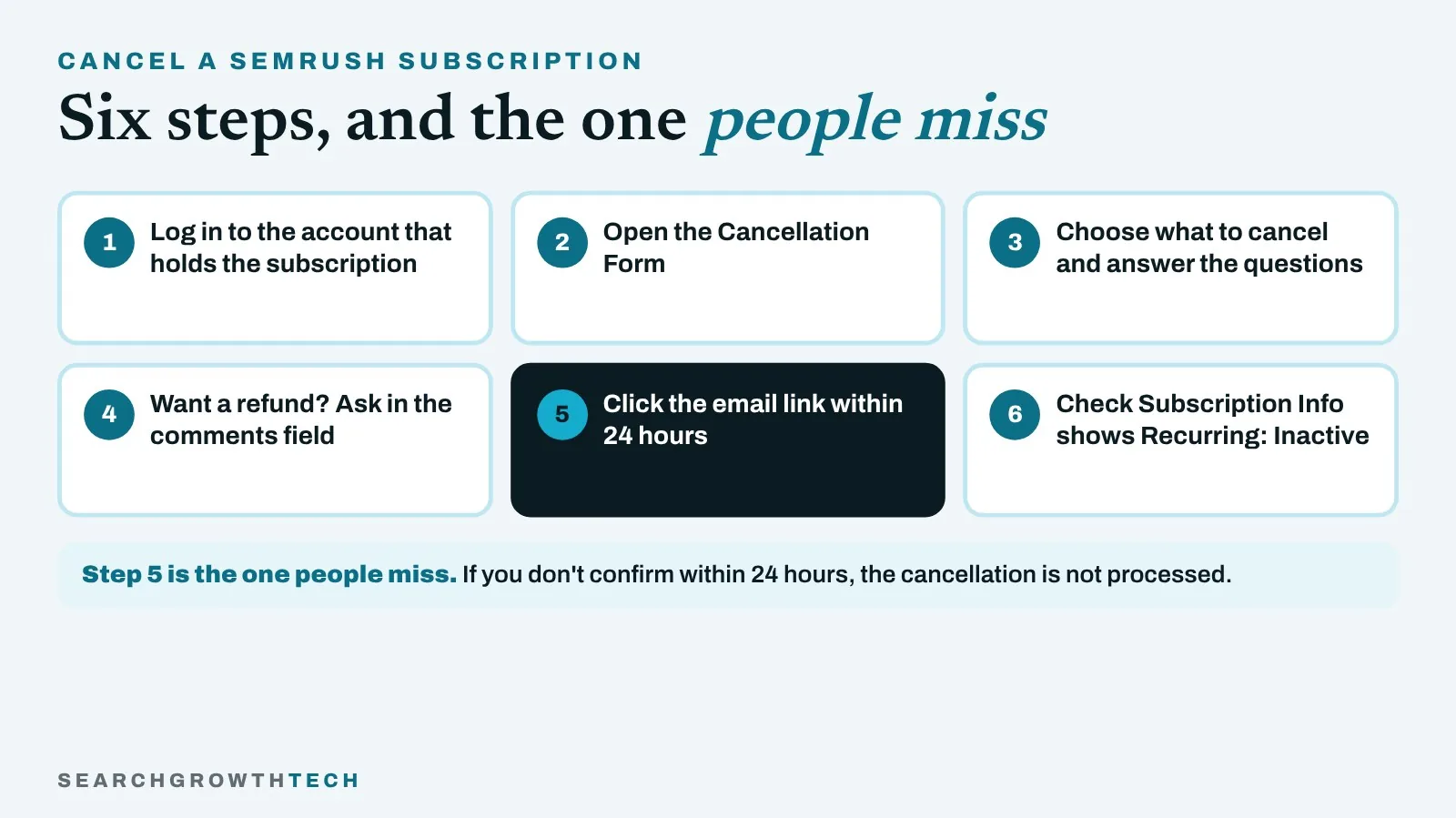
- Log in to the Semrush account associated with the subscription or trial.
- Open the Cancellation Form. Either go to it directly while logged in, or open Subscription Info, find Recurring: Active, and follow the Contact us link.
- Choose what to cancel (see the table below) and answer all the questions in the form.
- Want a refund? Say so clearly in the additional comments field. Cancelling on its own does not request one.
- Submit the form.
- Open the confirmation email and click the link within 24 hours. Check spam or junk if you don’t see it. Semrush says that if you don’t confirm within 24 hours, the cancellation is not processed and billing continues.
- Wait for the completion email. Confirming creates a support case, and Semrush emails you when the cancellation is done.
- Verify. Subscription Info should now show Recurring: Inactive.
What to Select in the Cancellation Form
Semrush is sold as separate toolkits, so the form asks which one you’re cancelling.
| You want to… | Select |
|---|---|
| Cancel everything you pay for | All Semrush subscriptions (includes add-ons and apps) |
| Cancel one toolkit, such as Local | That toolkit only |
| Cancel an older Pro, Guru or Business plan | SEO Toolkit |
| Cancel two or more toolkits but keep the rest | Submit a separate form for each toolkit |
Cancelling Add-Ons, Extra Users and Apps
These don’t go through the Cancellation Form.
| What you’re removing | How |
|---|---|
| Add-ons and extra limits (additional users, keyword limits, PDF reports, API units, locations) | Send a request through Semrush’s Contact Form, naming the add-on. Support follows up |
| App subscriptions or app trials | Go to My Apps, open the app’s Settings, and click Cancel trial or Cancel app subscription. Some apps ask you to contact the App Center team instead |
Planning to upgrade rather than leave? Semrush says add-ons active at the time of an upgrade carry over and are charged on the new billing cycle. Remove unwanted add-ons first, wait for confirmation, then upgrade.
How to Cancel a Semrush Free Trial
Use exactly the same Cancellation Form. Timing is what matters: Semrush says a trial that isn’t cancelled before it ends automatically converts to a paid subscription and you are charged.
Two trial details worth knowing:
- Cancel a day or two early, so the 24-hour confirmation link doesn’t push you past the trial end.
- Semrush says payments from a standalone trial that converts to a paid monthly subscription are not covered by the 7-day money-back guarantee.
Can You Get a Refund?
Semrush offers a one-time, 7-day money-back guarantee, but only in specific cases.
| Situation | Eligible for the 7-day guarantee? |
|---|---|
| First purchase of a subscription or toolkit with a 12-month or longer commitment, bought on Semrush.com with a credit card | Yes, if you request it in writing within 7 calendar days |
| First purchase of an add-on for an existing subscription | Yes, within 7 calendar days |
| Month-to-month subscription | No |
| Renewal charge | No |
| Monthly charge after a standalone trial converts | No |
| You have a signed agreement with Semrush | Your agreement’s terms apply instead |

Note that toolkits count as standalone subscriptions, not add-ons. Buying a second toolkit, such as AI Visibility on top of SEO, is not an “add-on purchase” for refund purposes.
How to Request a Refund
- Cancelling and want a refund: use the Cancellation Form and state the refund request in the additional comments field.
- Only want a refund: use the Contact Form from the email address on the account.
Semrush says approved refunds are processed within 30 calendar days and go back to the original payment method. You can check the status in Subscription Info, then Payments, where a processed refund shows as Refunded. Semrush may ask for the last four digits of your card. Never send the full card number.
What Happens After You Cancel
- You keep a free account. You can still log in with free-plan limits.
- Projects are locked. Website Monitoring projects created under paid limits stay visible but locked.
- 30-day grace period. If you renew your paid SEO Toolkit within 30 days, your Website Monitoring data is restored.
- After 30 days, data is deleted down to free-plan limits. Semrush says only the data in your oldest project is kept.
Cancel, Downgrade or Delete Your Account?
| Option | What it does | How |
|---|---|---|
| Cancel | Stops renewal. You keep a free account | Cancellation Form |
| Downgrade | Moves you to a cheaper plan | Contact Semrush Support |
| Delete account | Permanently removes the account | Request through Support while logged in, then click the removal link within 72 hours. Semrush says deletion happens within 30 days |
Cancelling does not delete your account, and deleting is permanent. If you might come back, cancel instead.
Troubleshooting
“I Cancelled but Still Got Charged”
- Check Subscription Info. If it still shows Recurring: Active, the cancellation was never completed, usually because the confirmation link wasn’t clicked within 24 hours.
- Search your inbox and spam for the confirmation and completion emails.
- Contact Semrush Support from the account’s email address with the date you submitted the cancellation and the date of the charge. Semrush says it will review whether the charge qualifies for a refund.
“I Can’t Log In”
Contact Semrush Support from the email address on the account. Semrush asks for the account email, the card type and its last four digits, and the amount and date of your last payment.
Old Advice You Can Ignore
Some older guides say to cancel by email or phone, or by clicking a “Disable” button on the Recurring status. Semrush’s current help center sends you to the Cancellation Form, so use that.
Looking for an alternative before you cancel? Compare the options in our guides on what Semrush is and what each toolkit does, what Ahrefs is, and Semrush vs Moz.
Key Takeaways
- Cancel through Semrush’s Cancellation Form while logged in to the account that holds the subscription.
- Click the confirmation email link within 24 hours, or the cancellation is not processed.
- Check that Subscription Info shows Recurring: Inactive.
- Add-ons are removed through the Contact Form, and apps from My Apps.
- Refunds are not automatic. Monthly plans and renewals are not covered by the 7-day guarantee.
- Website Monitoring data is kept for 30 days in case you renew.
FAQs
How Do I Cancel My Semrush Subscription?
Log in, open the Cancellation Form (or go to Subscription Info and click Contact us next to Recurring: Active), choose the toolkit or All Semrush subscriptions, submit, and click the confirmation link in Semrush’s email within 24 hours.
Can I Cancel Semrush Anytime?
Yes. Cancelling stops future renewals. Semrush says cancelling during your current term does not entitle you to a refund of fees you’ve already paid or committed to.
Does Semrush Give Refunds?
Only in specific cases: a one-time 7-day money-back guarantee for an initial purchase with a 12-month or longer commitment, or an initial add-on purchase, bought on Semrush.com by credit card. Monthly plans and renewals are not eligible.
How Do I Know My Semrush Subscription Is Cancelled?
Subscription Info shows Recurring: Inactive, and you receive an email from Semrush confirming the cancellation is complete.
How Do I Cancel a Semrush Free Trial?
Use the same Cancellation Form before the trial ends. If you don’t, the trial converts to a paid subscription and you are charged.
Will I Lose My Data if I Cancel Semrush?
Your Website Monitoring data is kept for 30 days. If you don’t renew in that time, it is deleted except for your oldest project, under free-plan limits.