You’ve found hundreds of spammy-looking backlinks in Ahrefs and want them gone. So you look for a “disavow” button in Ahrefs that sends them to Google. There isn’t one. Ahrefs can find, filter and export the links, but only Google’s own disavow tool can tell Google to ignore them.
In short: to disavow URLs with Ahrefs, find the bad links in Site Explorer’s Backlinks or Referring domains report, export them, turn them into a .txt file with one URL or domain:example.com line each, and upload that file to Google’s disavow links tool for your Search Console property. Ahrefs itself cannot send a disavow file to Google. Its “Best links” filter can hide up to 10,000 URLs from your Ahrefs reports, which Ahrefs calls a “soft disavow” that works inside Ahrefs only. Facts below were checked against Google’s Search Console Help and Ahrefs’ help center on 5 November 2026.
Before you start, there is one question that matters more than any of the steps: should you disavow at all?
Step 0: Check Whether You Need to Disavow
Google’s disavow page says it can usually judge which links to trust on its own, so most sites don’t need the tool. Google and Ahrefs both say you should disavow only when both of these are true:
- You have a considerable number of spammy, artificial or low-quality links pointing to your site, and
- Those links have caused a manual action, or are likely to cause one.
To check for a manual action, open Google Search Console and go to Security & Manual Actions, then Manual actions. An “Unnatural links to your site” notice is the clearest reason to disavow.
| Your situation | What to do |
|---|---|
| Manual action for unnatural links | Remove what you can, disavow the rest, then request reconsideration |
| You bought links or joined link schemes in the past | Consider disavowing those links, since a manual action is likely |
| Random spam links you never asked for | Usually nothing. Google says it ignores most of these |
| Low DR links from small but real sites | Keep them. Ahrefs says DR alone does not make a link spammy |
| You just want cleaner Ahrefs reports | Use the Best links filter, not Google’s tool |
Google also warns that the disavow tool is an advanced feature, and using it wrongly can harm your site’s performance in Google Search.
Ahrefs “Soft Disavow” vs Google’s Disavow Tool
These two get mixed up constantly. They do completely different jobs.
| Ahrefs Best links filter | Google disavow links tool | |
|---|---|---|
| What it changes | What you see in Ahrefs reports, charts and exports | Which links Google considers for your site |
| Effect on Google rankings | None | Can help with a link-related manual action, or hurt if misused |
| Limit | Up to 10,000 URLs in “Exclude domains,” according to Ahrefs | 100,000 lines and 2MB per file, according to Google |
| Who can use it | Anyone with Ahrefs access to the report | A verified owner of the Search Console property |
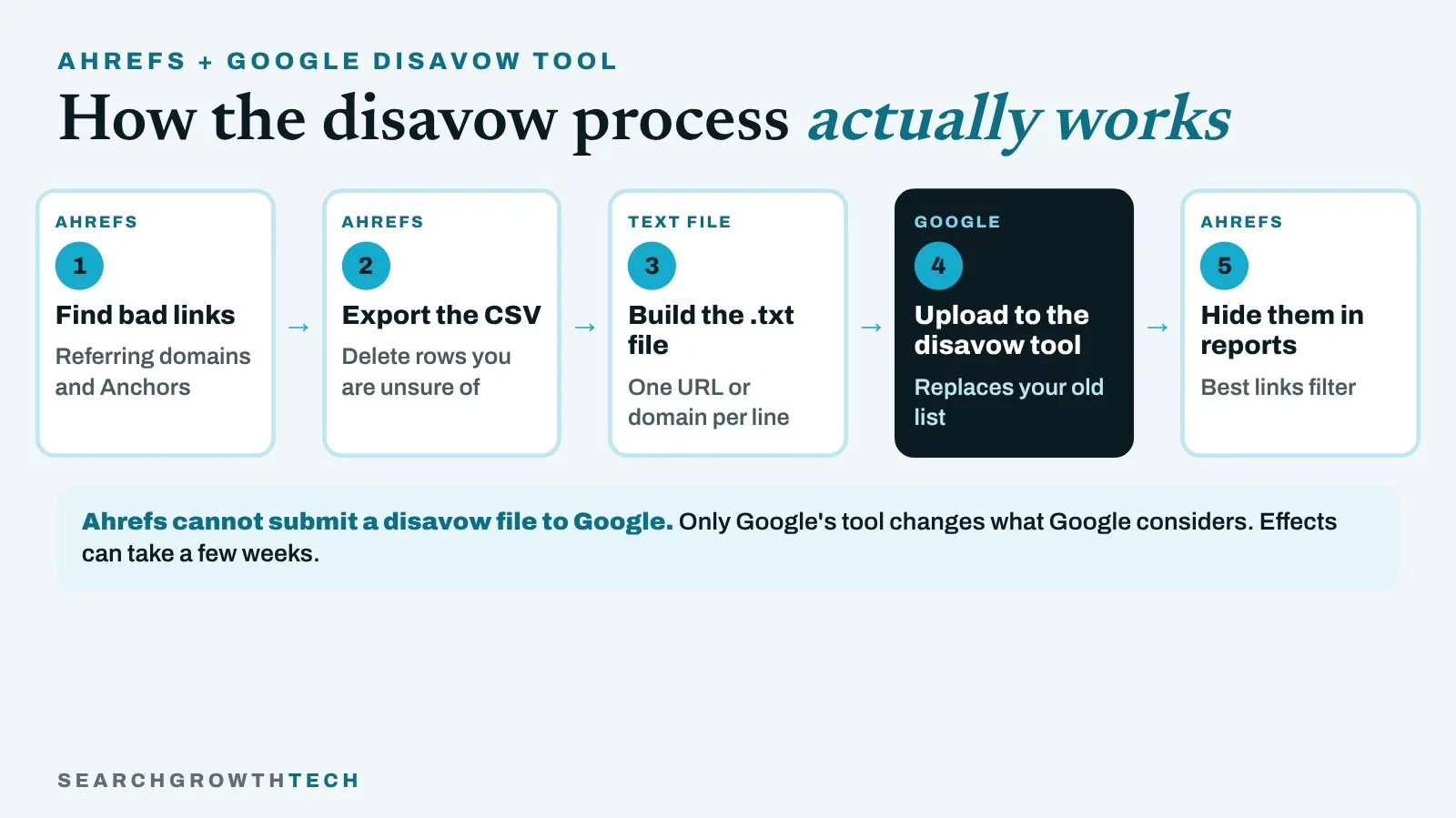
A good workflow uses both: Google’s tool to disavow, and Ahrefs’ filter to hide the same domains so your Ahrefs reports match what you told Google.
Step 1: Find the Bad Links in Ahrefs
- Open Site Explorer and enter your domain.
- Start with the Referring domains report rather than Backlinks. Most spam comes in whole domains, and disavowing at domain level is simpler and covers pages Ahrefs hasn’t found yet.
- Check the Anchors report for anchor text that has nothing to do with your business, such as casino, pharma or adult terms, or exact-match money keywords you never targeted.
- Use filters to build a shortlist for review, not a final list. Useful signals include very high outgoing link counts, no organic traffic, irrelevant languages and repeated anchor patterns.
- Open a sample of the linking pages yourself before you decide.
Ahrefs does not have a spam score, and its help center explains why: Google does not publish a metric that defines a spammy link. Treat every number in Ahrefs as a reason to look, not a verdict.
A Quick Review Checklist
| Usually worth disavowing | Usually leave alone |
|---|---|
| Links you paid for or got through link exchanges | New or small sites that mention you naturally |
| Pages built only to hold links, with hundreds of outgoing links | Directories and business listings you created yourself |
| Hacked pages or injected links in irrelevant content | Scraper copies of your content (Google usually ignores them) |
| Private blog networks linked to past SEO work | Forum, social and comment links you didn’t build |
Step 2: Export the Links From Ahrefs
- In the Referring domains or Backlinks report, apply your filters.
- Click Export and download the CSV.
- Open it in Google Sheets or Excel and delete every row you are not sure about. Google says to remove any URLs you don’t want to disavow before uploading.
Step 3: Turn the Export Into a Disavow File
Google’s format rules, from its Search Console Help page:
| Rule | Requirement |
|---|---|
| File type | Plain text, name ending in .txt |
| Encoding | UTF-8 or 7-bit ASCII |
| Entries | One URL or domain per line |
| Whole domains | Prefix with domain:, for example domain:spam-site.com |
| Comments | Lines starting with # are ignored |
| Size limits | 100,000 lines (including blank and comment lines) and 2MB |
| URL length | Up to 2,048 characters |
| Not allowed | Disavowing a subpath such as example.com/blog/ |

Spreadsheet Shortcut
If your domains are in column A starting at row 2, put this formula in B2 and drag it down:
="domain:"&A2Copy column B into a plain text editor and save it as a UTF-8 .txt file. Don’t save it from Excel as CSV, because that can add commas or quotes Google will reject.
Example File
# Disavow file for example.com
# Updated 5 November 2026, after manual action review
domain:cheap-links-network.com
domain:spammy-directory.net
https://hacked-blog.example/old-post/casino-page.html
Dated comments cost nothing and make the file easy to review later.
Step 4: Upload the File to Google
- Open Google’s disavow links tool while signed in to Search Console as a property owner.
- Select the property.
- Upload your .txt file. If it has errors, Google shows them immediately and keeps your old list.
Three rules catch people out:
- Domain properties are not supported. Google says the tool works with URL-prefix properties. If you use both
http://andhttps://properties, upload a list for each. - A new upload replaces the old list. Each property has one disavow list. If you upload only this month’s new domains, every earlier entry is gone. Keep one master file and add to it.
- It is not instant. Google says it can take a few weeks to incorporate the list.
If you had a manual action, submit a reconsideration request in Search Console once the cleanup is done, explaining which links you removed and which you disavowed.
Step 5: Hide the Same Domains in Ahrefs
Disavowed links do not disappear from anywhere. Google says they still appear in Search Console’s Links report, and Ahrefs has no way of knowing what you disavowed with Google. To keep your Ahrefs reports consistent:
- Open the Best links filter in Site Explorer.
- Paste your disavowed domains into Exclude domains (up to 10,000 URLs, according to Ahrefs).
- Your backlink charts, tables and exports now show your profile without those links.
How to Undo a Disavow
If you disavowed good links by mistake, upload a corrected file without them. To remove everything, select the property in the disavow tool and click Cancel disavowals. Google says either change can also take a few weeks.
Common Mistakes
- Disavowing by DR alone. Ahrefs says DR, UR or any single metric is not enough to call a link manipulative.
- Uploading a partial list. It overwrites the whole previous list.
- Using a Domain property. The tool needs a URL-prefix property.
- Disavowing a folder. Subpaths are not supported. List the URLs or the whole domain.
- Expecting Ahrefs numbers to change. Google’s disavow does not change Ahrefs data. Use the Best links filter for that.
- Disavowing spam you never built “just in case.” Google says most sites don’t need the tool.
Not sure what Ahrefs can and can’t do? See our guide on what Ahrefs is and who it is for, or browse our SEO Tools coverage.
Key Takeaways
- Ahrefs cannot submit a disavow file to Google. Use it to find and export bad links, then upload a file to Google’s disavow tool.
- Disavow only when you have many spammy links and a manual action, or a likely one.
- Use
domain:lines in a UTF-8 .txt file, up to 100,000 lines and 2MB. - Each upload replaces your previous list, so keep one master file.
- Add disavowed domains to Ahrefs’ Best links “Exclude domains” field so your reports match.
FAQs
Does Ahrefs Have a Disavow Tool?
Not one that talks to Google. Ahrefs’ help center describes its Best links filter, which can exclude up to 10,000 URLs, as a soft disavow that works within Ahrefs only. To disavow for Google, upload a file to Google’s disavow links tool.
How Do I Export Backlinks From Ahrefs to Disavow?
Open Site Explorer, go to Referring domains or Backlinks, apply filters, click Export, then review the CSV and convert the entries you are sure about into a .txt disavow file.
Should I Disavow URLs or Domains?
Usually domains, using the domain: prefix. It covers every page on that site, including ones Ahrefs has not found. Disavow single URLs only when the rest of the site is fine.
How Long Does a Disavow Take to Work?
Google says it can take a few weeks after a successful upload for the list to be incorporated.
Can Disavowing Links Hurt My Rankings?
Yes, if you disavow good links. Google calls it an advanced feature that can harm your search performance if used incorrectly.
Why Do Disavowed Links Still Show in Ahrefs?
Google does not share your disavow list with anyone. Ahrefs still sees the links on the web. Add those domains to the Best links “Exclude domains” field to hide them in your reports.