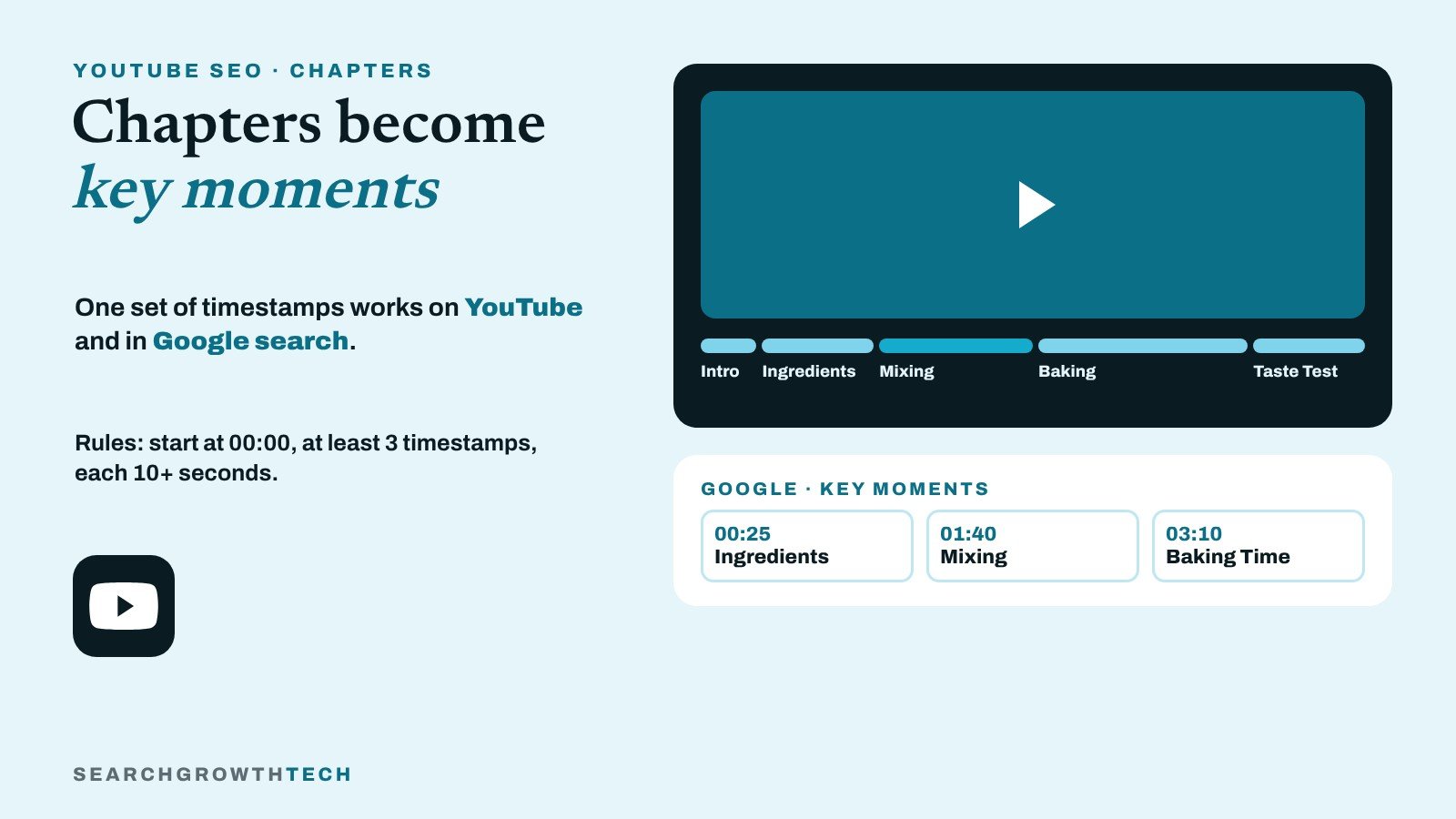
Chapters do two jobs at once. On YouTube, they split a video into labeled sections viewers can jump between. On Google, the same timestamps can appear as “key moments” under a video result, sending searchers straight to the part that answers their question. AI search is moving the same way: one 2026 study found half of the YouTube citations in Google AI Overviews were timestamped links. Yet most creators either skip chapters or label them “Part 1, Part 2.”
In short: YouTube chapters need a first timestamp of 00:00, at least three timestamps in ascending order, and sections of at least 10 seconds, according to YouTube Help. YouTube can also create chapters automatically, and you can opt out. On Google, key moments for YouTube videos can be enabled automatically based on the description, and Google says it prefers timestamps and labels you list there. Labels should describe the content in the words people search, because those labels are what show up as key moments. Facts below were checked against YouTube Help and Google Search Central on 5 November 2026.
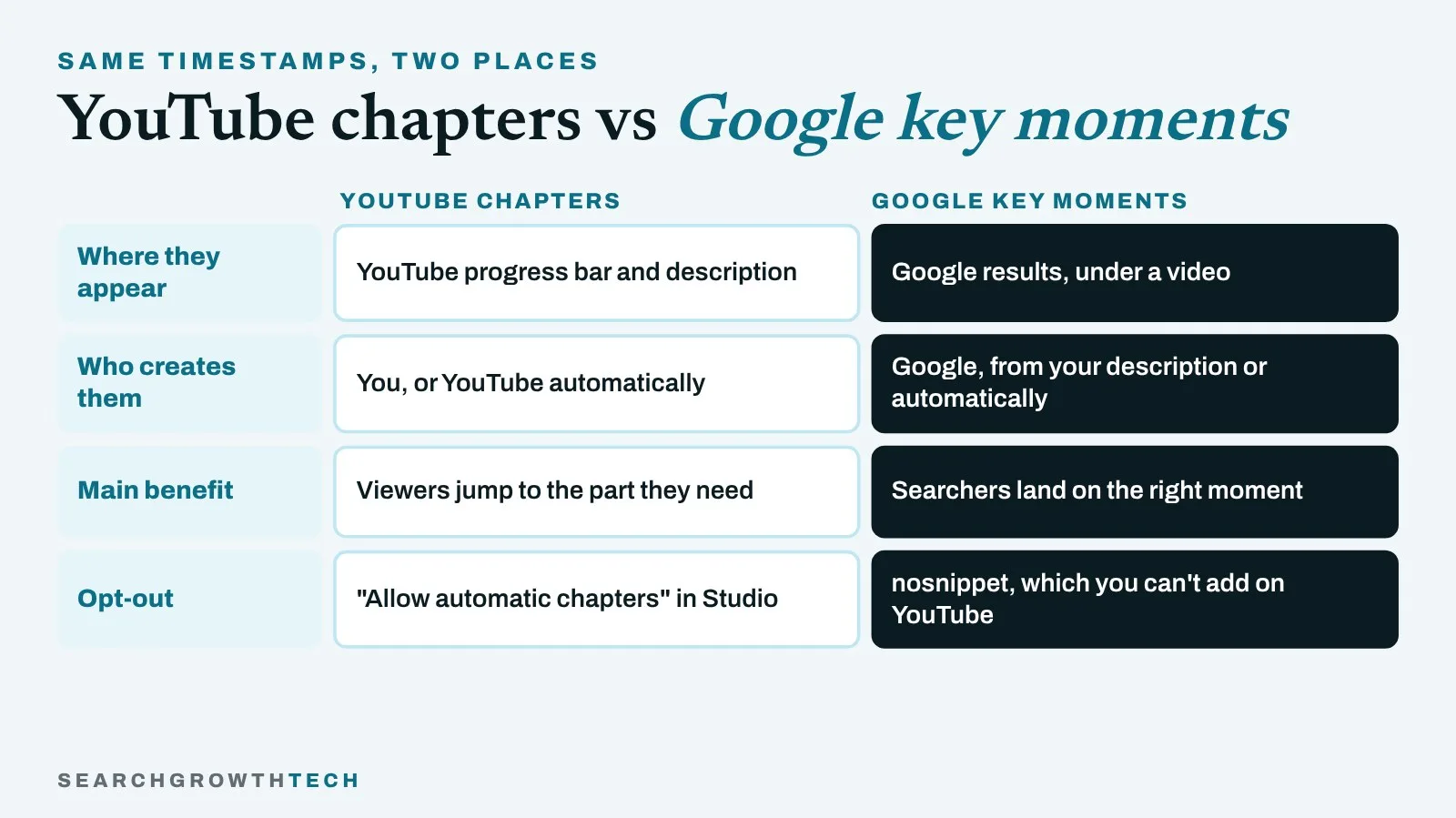
Chapters vs Key Moments
| YouTube chapters | Google key moments | |
|---|---|---|
| Where they appear | YouTube player progress bar and description | Google search results, under a video |
| Who creates them | You, or YouTube automatically | Google, from your description or automatically |
| Main benefit | Viewers jump to the part they need | Searchers land on the right moment from Google |
| Opt-out | “Allow automatic chapters” setting in YouTube Studio | nosnippet meta tag, which you can’t add on YouTube |
YouTube’s Chapter Rules
- The first timestamp must be 00:00.
- List at least three timestamps, in ascending order.
- Each chapter must be at least 10 seconds long.

YouTube Help adds that adding your own chapters overrides automatic ones. Chapters may not be available if a channel has active strikes or the content may be inappropriate for some viewers. If you don’t have access, YouTube says to apply for access to Advanced features.
How to Add Chapters
- Open the video’s details in YouTube Studio.
- In the description, add a list of timestamps and titles, one per line.
- Start with 00:00 and follow the rules above.
- Save. Chapters appear on the progress bar.
Automatic Chapters
YouTube says not all videos are eligible for automatic chapters, and not all eligible videos get them. To opt out for one video, untick “Allow automatic chapters” under Show more. To change the default, use Settings, then Upload defaults.
Google’s Rules for Key Moments From YouTube
Google’s video structured data documentation says Google Search may automatically enable key moments for a YouTube video based on its description, and that you can specify timestamps and labels there. Google’s formatting guidance:
- Use hour:minute:second, leaving out the hour for videos under an hour.
- Put each label on the same line as its timestamp, one timestamp per line.
- Give each label at least one word.
- List timestamps in chronological order.
For videos hosted on your own site, Google offers Clip and SeekToAction structured data instead.
Chapter Titles as Keywords
Each chapter label can be shown in Google as a key moment, so it acts like a mini headline. Write labels the way people search:
| Vague label | Search-friendly label |
|---|---|
| Intro | Intro (keep this short) |
| Step 2 | How Much Flour to Add |
| Part 3 | Fixing a Runny Starter |
| Results | Before and After: 24 Hours Later |
| Q&A | Can You Use Whole Wheat Flour? |
Questions make strong labels. Viewers and search systems can match “Can you use whole wheat flour?” to a query almost word for word.
Why Chapters Matter for AI Search
BrightEdge research published in August 2026 looked at how AI engines cite YouTube between May and August 2026. It found that 50% of YouTube citations in Google AI Overviews were timestamped URLs, compared with 0.6% in ChatGPT. BrightEdge’s reading: Google navigates inside videos, while ChatGPT picks whole videos. Chapters make the “inside” navigable. See our guide on getting YouTube videos cited in AI Overviews and ChatGPT.
Ask YouTube, YouTube’s conversational search, also linked a main cited video to a timestamped section in testing, according to Search Engine Journal. See Ask YouTube explained.
How to Plan Chapters Before Filming
- List the questions your video answers.
- Make each question a section with a clear spoken transition: “Now, how much flour to add.”
- Answer early in each section, then explain.
- Keep sections focused. One question per chapter.
- Write labels from your list after editing, using the real timestamps.
Chapters on Existing Videos
You don’t need to re-upload. Adding chapters to older videos is one of the fastest improvements for a back catalog:
- Start with videos that already get search traffic, using YouTube Studio’s traffic source report.
- Watch with the transcript open and note where topics change.
- Add timestamps and descriptive labels to the description.
- Check the progress bar shows chapters.
Common Chapter Mistakes
| Mistake | Result |
|---|---|
| First timestamp isn’t 00:00 | Chapters don’t appear |
| Only two timestamps | Chapters don’t appear |
| A section under 10 seconds | Chapters may not appear |
| Generic labels | Weak key moments and nothing for search to match |
| Timestamps out of order | Breaks both YouTube and Google rules |
| Labels that don’t match the content | Misleads viewers and wastes the click |
Do Chapters Help Rankings?
YouTube doesn’t name chapters as a ranking factor. They help viewers find what they came for, which supports engagement and satisfaction, the signals YouTube does name. On Google, they create extra entry points through key moments. For the signals behind this, see YouTube satisfaction signals.
Chapter Examples by Video Type
| Video type | Example chapter list |
|---|---|
| Recipe | 00:00 Intro, 00:15 Ingredients, 01:05 Making the Dough, 03:40 Shaping, 05:10 Baking Time and Temperature, 07:00 Taste Test |
| Product review | 00:00 Verdict in 20 Seconds, 00:25 Design and Build, 02:00 Battery Life Test, 04:30 Camera Samples, 06:45 Who Should Buy It |
| Software tutorial | 00:00 What We’re Building, 00:30 Install, 02:15 First Setup, 04:50 Common Error and Fix, 07:20 Next Steps |
| Podcast | 00:00 Intro, 01:30 Guest Background, 08:10 Pricing Strategy, 21:40 Hiring Mistakes, 35:00 Listener Questions |
| Machine demo | 00:00 Overview, 00:30 Loading, 01:20 Running at Full Capacity, 02:40 Output Check, 03:30 Cleaning |
Chapters on Shorts and Live Streams
Shorts are too brief for useful chapters, and YouTube’s 10-second minimum per chapter limits them anyway. For live streams, add chapters to the saved replay once the stream ends, so people who find it later can skip to the key parts. Long replays benefit the most, because viewers rarely watch them from start to finish.
Using Chapters to Plan Shorts
A well-labeled chapter is often a ready-made Short. If a chapter answers one question in under three minutes, cut it into a vertical Short with the same question as its title. That gives the answer a second way to be found in Shorts search and in Google’s AI surfaces, where BrightEdge found Shorts made up 17.5% of YouTube citations.
Key Takeaways
- Chapters need 00:00 first, at least three timestamps and 10-second minimum sections.
- Google can create key moments from YouTube descriptions and prefers your timestamps.
- Chapter labels can appear in Google, so write them like search phrases or questions.
- Half of YouTube citations in Google AI Overviews were timestamped links in BrightEdge’s 2026 data.
- Adding chapters to older videos is quick and doesn’t need a re-upload.
FAQs
How Do I Add Chapters to a YouTube Video?
Add timestamps and titles to the description, starting at 00:00, with at least three timestamps and 10-second minimum sections.
Why Aren’t My YouTube Chapters Showing?
Check the first timestamp is 00:00, there are at least three, each is 10 seconds or longer, and they’re in order. Active strikes can also block chapters.
What Are Key Moments in Google?
Labeled links under a video result in Google that jump to specific points in the video.
Do YouTube Chapters Create Google Key Moments?
They can. Google says it may use timestamps and labels from a YouTube description for key moments.
Should Chapter Titles Include Keywords?
Yes, naturally. Describe the content in words people search, often as a question.
Can I Turn Off Automatic Chapters?
Yes. Untick “Allow automatic chapters” for a video, or change it in Upload defaults.